
Palo_Alto_Networks
PCNSE · Question #439
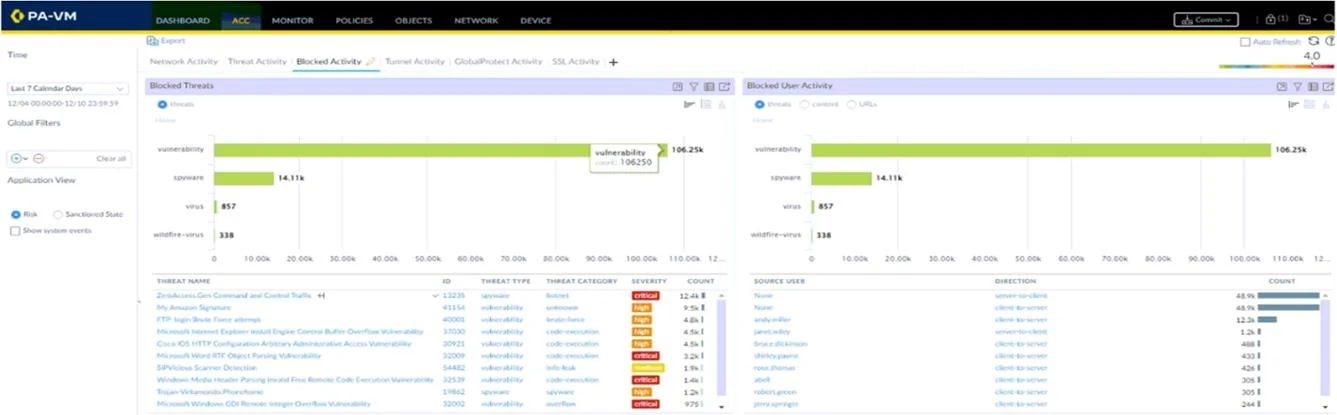
Refer to the exhibit. Using the above screenshot of the ACC, what is the best method to set a global filter, narrow down Blocked User Activity, and locate the user(s) that could be compromised by a…
Sign in or unlock PCNSE to reveal the answer and full explanation for question #439. The question stem and answer options stay visible for context.
Submitted by carter_n· Apr 18, 2026Operate
Question
Refer to the exhibit. Using the above screenshot of the ACC, what is the best method to set a global filter, narrow down Blocked User Activity, and locate the user(s) that could be compromised by a botnet?
Exhibit
Options
- AClick the hyperlink for the Zero Access.Gen threat.
- BClick the left arrow beside the Zero Access.Gen threat.
- CClick the source user with the highest threat count.
- DClick the hyperlink for the botnet Threat Category.
Unlock PCNSE to see the answer
You've previewed enough free PCNSE questions. Unlock PCNSE for full answers, explanations, the timed quiz mode, progress tracking, and the master PDF. Question stem and options stay visible so you can still see what's on the exam.
Topics
#ACC (Application Command Center)#Filtering#Botnet detection#User monitoring