
PCNSE · Question #230
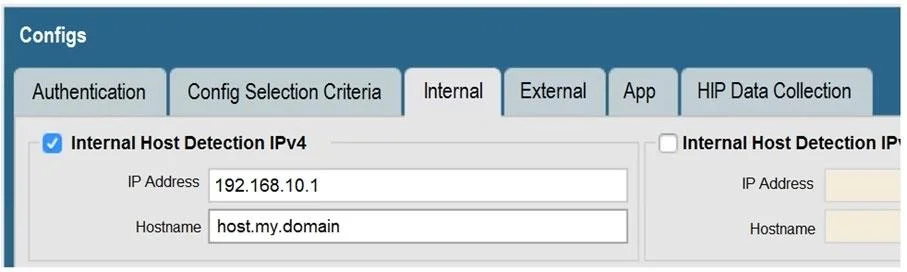
View the GlobalProtect configuration screen capture. What is the purpose of this configuration?
The correct answer is C. It enables a client to perform a reverse DNS lookup on 192.168.10.1 to detect that it is an. The configuration shown is the GlobalProtect 'Internal Host Detection' feature. When a GlobalProtect client connects, it needs to determine whether it is already inside the corporate network (on-net) or outside (off-net). To do this, the client performs a reverse DNS (PTR…
Question
View the GlobalProtect configuration screen capture. What is the purpose of this configuration?
Exhibit
Options
- AIt configures the tunnel address of all internal clients to an IP address range starting at
- BIt forces an internal client to connect to an internal gateway at IP address 192.168.10.1.
- CIt enables a client to perform a reverse DNS lookup on 192.168.10.1 to detect that it is an
- DIt forces the firewall to perform a dynamic DNS update, which adds the internal gateway's
How the community answered
(35 responses)- B3% (1)
- C94% (33)
- D3% (1)
Explanation
The configuration shown is the GlobalProtect 'Internal Host Detection' feature. When a GlobalProtect client connects, it needs to determine whether it is already inside the corporate network (on-net) or outside (off-net). To do this, the client performs a reverse DNS (PTR record) lookup against the IP address specified in this setting (192.168.10.1). If the DNS lookup succeeds and returns the expected hostname, the client concludes it is on the internal network and may connect to an internal gateway or skip the VPN tunnel entirely. This mechanism prevents unnecessary VPN tunneling for users already on the corporate LAN. It does not assign tunnel IP addresses, force a tunnel to that IP, or trigger dynamic DNS updates.
Topics
Community Discussion
No community discussion yet for this question.