
PCNSE · Question #138
What are three valid options when creating a new security policy? (Choose three.)
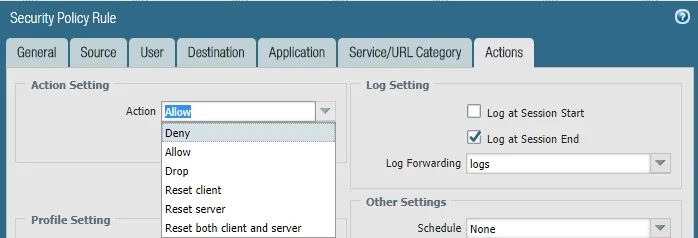
The correct answer is B. Reset client F. Deny G. Allow. Valid actions for a Palo Alto Networks security policy include Reset client, Deny, and Allow, which control how the firewall handles matching traffic.
Question
What are three valid options when creating a new security policy? (Choose three.)
Exhibit
Options
- AReset All
- BReset client
- CBlock
- DDeny All
- EAlert
- FDeny
- GAllow
How the community answered
(21 responses)- B90% (19)
- C5% (1)
- D5% (1)
Why each option
Valid actions for a Palo Alto Networks security policy include `Reset client`, `Deny`, and `Allow`, which control how the firewall handles matching traffic.
`Reset All` is not a standard, valid action option for security policies; standard reset options are `Reset client` and `Reset server`.
The `Reset client` action sends a TCP reset to the client, terminating the session from the client's side, which is a specific and valid security policy action.
`Block` is not a standard action in Palo Alto Networks security policies; `Deny` or `Drop` are typically used to block traffic.
`Deny All` is not a standard, valid action option; the available actions are `Allow`, `Deny`, `Drop`, `Reset client`, and `Reset server`.
`Alert` is not a direct security policy action that controls traffic flow; rather, it's a component of an alert profile or specific logging settings, not a policy action itself.
The `Deny` action silently drops traffic without sending a TCP reset or ICMP unreachable message, effectively blocking the connection.
The `Allow` action permits traffic that matches the security policy rules to pass through the firewall.
Concept tested: Security policy actions
Source: https://docs.paloaltonetworks.com/pan-os/11-1/pan-os-admin/policy/security-policy/security-policy-actions.html
Topics
Community Discussion
No community discussion yet for this question.