
Palo_Alto_Networks
PCNSC · Question #1
View the GlobalProtect configuration screen capture. What is the purpose of this configuration?
The correct answer is D. It enables a Client to perform a reverse DNS lookup on 192.168.10.1 to delect it is an internal. https://docs.paloaltonetworks.com/globalprotect/10-1/globalprotect-admin/globalprotect- portals/define-the-globalprotect-app-configurations
VPN and High Availability
Question
View the GlobalProtect configuration screen capture. What is the purpose of this configuration?
Exhibit
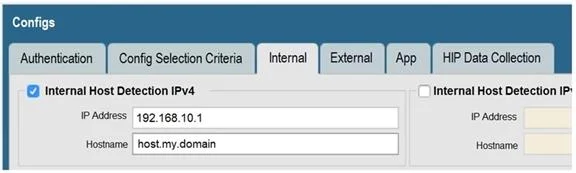
Options
- AIt forces an internal client to connect to an internal gateway at IP address 192.168.10.1.
- BIt configures the tunnel address of all internal clients lo an IP address range starting at
- CIt forces the firewall to perform a dynamic DNS update, Which adds the internal gateway's
- DIt enables a Client to perform a reverse DNS lookup on 192.168.10.1 to delect it is an internal
How the community answered
(35 responses)- A3% (1)
- B9% (3)
- C6% (2)
- D83% (29)
Explanation
https://docs.paloaltonetworks.com/globalprotect/10-1/globalprotect-admin/globalprotect- portals/define-the-globalprotect-app-configurations
Topics
#GlobalProtect#internal gateway detection#reverse DNS#split tunneling
Community Discussion
No community discussion yet for this question.