
PCNSA · Question #8
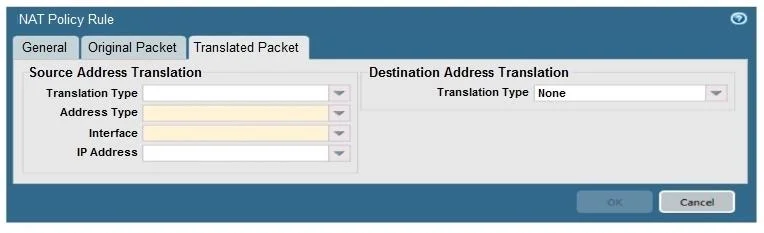
When creating a Source NAT policy, which entry in the Translated Packet tab will display the options Dynamic IP and Port, Dynamic, Static IP, and None?
The correct answer is A. Translation Type. In a Source NAT policy, the "Translation Type" field within the "Translated Packet" tab is where you select the NAT method such as Dynamic IP and Port, Dynamic, Static IP, or None.
Question
When creating a Source NAT policy, which entry in the Translated Packet tab will display the options Dynamic IP and Port, Dynamic, Static IP, and None?
Exhibit
Options
- ATranslation Type
- BInterface
- CAddress Type
- DIP Address
How the community answered
(44 responses)- A86% (38)
- B2% (1)
- C2% (1)
- D9% (4)
Why each option
In a Source NAT policy, the "Translation Type" field within the "Translated Packet" tab is where you select the NAT method such as Dynamic IP and Port, Dynamic, Static IP, or None.
The Translation Type field specifically determines the method used to translate the source IP address of outgoing packets, offering options like Dynamic IP and Port (PAT), Dynamic (many-to-many IP mapping), Static IP (one-to-one IP mapping), or None (no source NAT).
Interface specifies the outgoing network interface for the translated traffic, not the type of NAT translation.
Address Type is not a standard field in Palo Alto Networks NAT policies that presents these specific translation options.
IP Address is where you would specify a particular IP address for static NAT or a pool for dynamic NAT, but it's not the field that defines the *type* of translation.
Concept tested: Source NAT policy translation types
Source: https://docs.paloaltonetworks.com/pan-os/11-1/pan-os-admin/nat/configure-source-nat/source-nat-rules
Topics
Community Discussion
No community discussion yet for this question.