
PCNSA · Question #377
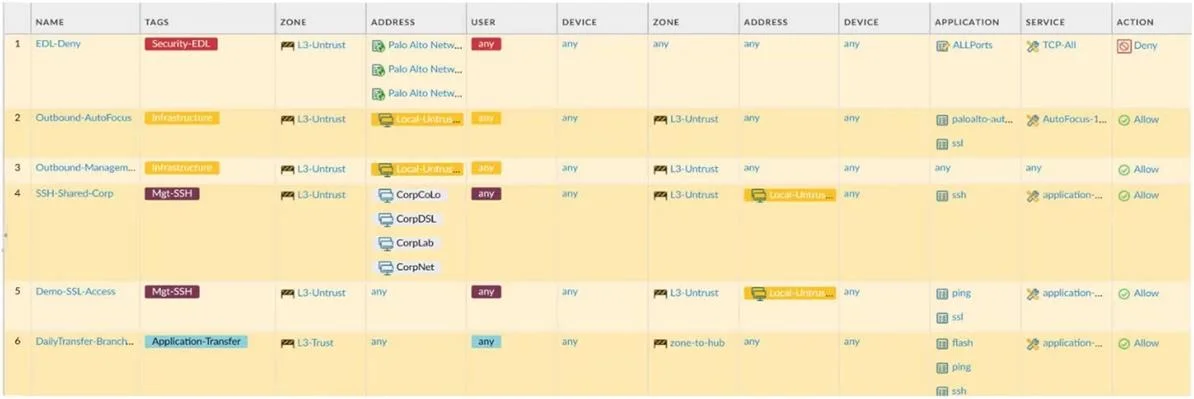
An administrator is reviewing the Security policy rules shown in the screenshot. Why are the two fields in the Security policy EDL-Deny highlighted in red?
The correct answer is D. Because the Security-EDL tag has been assigned the red color. The red highlighting of fields in the Security policy rule "EDL-Deny" indicates that a tag named "Security-EDL" has been applied to that rule and is configured to display with the color red.
Question
An administrator is reviewing the Security policy rules shown in the screenshot. Why are the two fields in the Security policy EDL-Deny highlighted in red?
Exhibit
Options
- ABecause antivirus inspection is enabled for this policy
- BBecause the destination zone, address, and device are all "any"
- CBecause the action is Deny
- DBecause the Security-EDL tag has been assigned the red color
How the community answered
(18 responses)- B6% (1)
- D94% (17)
Why each option
The red highlighting of fields in the Security policy rule "EDL-Deny" indicates that a tag named "Security-EDL" has been applied to that rule and is configured to display with the color red.
Antivirus inspection being enabled does not typically cause fields within a security policy rule to be highlighted in red.
Having "any" for destination zone, address, and device are common configurations and do not inherently cause red highlighting.
While the action is Deny, the action itself does not cause red highlighting of other fields in the rule; Deny rules are typically shown with a specific icon or status but not color-coded fields.
In Palo Alto Networks firewalls, administrators can assign tags to security policy rules. These tags can be associated with specific colors, which then highlight the rule or specific fields within the rule in the web interface for easier visual identification.
Concept tested: Security policy rule tagging and visual indicators
Source: https://docs.paloaltonetworks.com/pan-os/10-2/pan-os-admin/reference/tags
Topics
Community Discussion
No community discussion yet for this question.