
PCCSE · Question #43
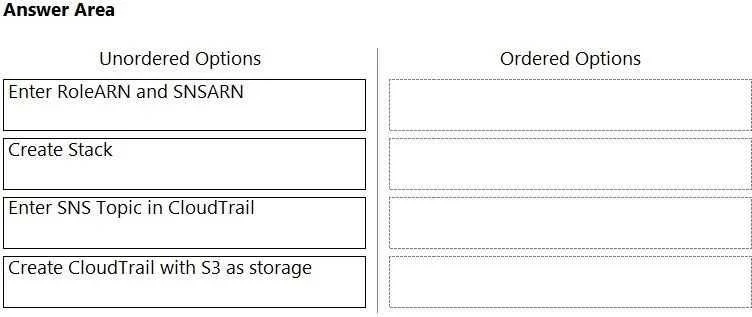
Drag and Drop Question Order the steps involved in onboarding an AWS Account for use with Data Security feature. Answer:
The correct answer is Create Stack; Create CloudTrail with S3 as storage; Enter SNS Topic in CloudTrail; Enter RoleARN and SNSARN. To onboard an AWS account for a data security feature, the correct sequence involves first establishing foundational resources via a CloudFormation stack, then configuring CloudTrail for logging and real-time notifications, and finally providing these resource identifiers to…
Question
Drag and Drop Question Order the steps involved in onboarding an AWS Account for use with Data Security feature. Answer:
Exhibit
Answer Area
Drag items
Correct arrangement
- Create Stack
- Create CloudTrail with S3 as storage
- Enter SNS Topic in CloudTrail
- Enter RoleARN and SNSARN
Explanation
To onboard an AWS account for a data security feature, the correct sequence involves first establishing foundational resources via a CloudFormation stack, then configuring CloudTrail for logging and real-time notifications, and finally providing these resource identifiers to the external security solution.
Approach. The correct interaction is to drag the options from the 'Unordered Options' column to the 'Ordered Options' column in the following sequence:
-
Create Stack: Many third-party data security solutions provide a CloudFormation template (a 'stack') to automate the setup of necessary AWS resources. This stack typically creates an IAM role with specific permissions for the security service to assume (RoleARN) and an SNS topic for real-time notifications (SNSARN). Establishing these foundational resources and permissions is the logical first step.
-
Create CloudTrail with S3 as storage: AWS CloudTrail is essential for auditing API calls and other events in your AWS account, which is the primary data source for a data security feature. It must be created and configured to deliver logs to an Amazon S3 bucket for storage and subsequent analysis.
-
Enter SNS Topic in CloudTrail: To enable real-time or near real-time monitoring, CloudTrail needs to be configured to publish notifications to an SNS topic whenever new log files are delivered to the S3 bucket. This SNS topic would typically have been created by the CloudFormation stack in the first step.
-
Enter RoleARN and SNSARN: Once all the necessary AWS infrastructure (the IAM role and the SNS topic created by the stack, and CloudTrail configured to use them) is in place, the Amazon Resource Names (ARNs) of the IAM role (RoleARN) and the SNS topic (SNSARN) are provided to the external data security solution. This final step completes the integration, allowing the external service to assume the role to access logs and subscribe to the SNS topic for real-time alerts.
Common mistakes.
- common_mistake. A common mistake would be to deviate from the logical dependency order. For instance, attempting to 'Enter RoleARN and SNSARN' before the IAM role and SNS topic have been created (often via 'Create Stack') would be incorrect. Similarly, configuring 'Enter SNS Topic in CloudTrail' before CloudTrail itself is created and configured with S3 storage would be out of sequence. Any order that doesn't respect the creation and configuration of foundational resources before their consumption or linking them together will lead to an incomplete or non-functional setup. For example, creating CloudTrail before the stack might mean you need to manually create the SNS topic and IAM role, which is less efficient and typically not the prescribed method for vendor integrations.
Concept tested. AWS CloudFormation for infrastructure provisioning, AWS CloudTrail for logging and auditing, AWS S3 for log storage, AWS SNS for real-time notifications, AWS IAM for access management (specifically IAM roles for cross-account or third-party access), and the overall process of integrating a third-party data security solution with an AWS account.
Topics
Community Discussion
No community discussion yet for this question.