
PCCSE · Question #258
Drag and Drop Question Put the steps of integrating Okta with Prisma Cloud in the right order in relation to CIEM or SSO okra integration. Answer: Exam Questions, Study Guides, Practice Tests. Lead…
The correct answer is Log in to your Okta administrator panel.; Generate an API token.; Configure Okta with Prisma Cloud.; Add an administrator role.; Run the IAM queries for Okta. The question requires ordering steps for integrating Okta with Prisma Cloud for CIEM or SSO, involving logging in, generating an API token, configuring the integration, adding roles, and running IAM queries.
Question
Drag and Drop Question Put the steps of integrating Okta with Prisma Cloud in the right order in relation to CIEM or SSO okra integration. Answer:
Exam Questions, Study Guides, Practice Tests. Lead the way to help you pass any IT Certification exams, 100% Pass Guaranteed or Full Refund. Especially Cisco, Microsoft, CompTIA, Citrix, EMC, HP, Oracle, VMware, Juniper, Check Point, LPI, Nortel, EXIN and so on. Our Slogan: First Test, First Pass. Help you to pass any IT Certification exams at the first try. You can reach us at any of the email addresses listed below. Any problems about IT certification or our products, you could rely upon us, we will give you satisfactory answers in 24 hours.
Exhibit
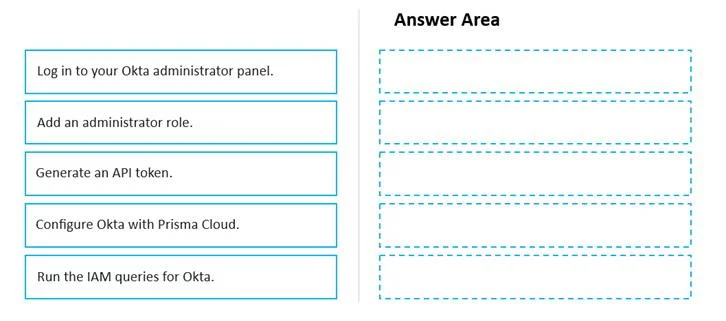
Answer Area
Drag items
Correct arrangement
- Log in to your Okta administrator panel.
- Generate an API token.
- Configure Okta with Prisma Cloud.
- Add an administrator role.
- Run the IAM queries for Okta.
Explanation
The question requires ordering steps for integrating Okta with Prisma Cloud for CIEM or SSO, involving logging in, generating an API token, configuring the integration, adding roles, and running IAM queries.
Approach. The correct interaction is to drag and drop the steps into the 'Answer Area' in the following order:
- Log in to your Okta administrator panel. - This is the prerequisite step to access any administrative functions or configurations within Okta.
- Generate an API token. - An API token from Okta is crucial for Prisma Cloud to authenticate and securely connect to Okta, allowing it to retrieve identity information such as users and groups for CIEM purposes. This token must be generated within the Okta admin console.
- Configure Okta with Prisma Cloud. - This step involves configuring the integration on the Prisma Cloud side. Typically, a user would navigate to Prisma Cloud's settings, add Okta as an identity provider, and input the Okta domain and the API token obtained in the previous step, establishing the primary service-to-service connection.
- Add an administrator role. - Following the initial integration setup, this step likely refers to defining and assigning specific administrative roles within Prisma Cloud that leverage the Okta identities. For instance, an 'Administrator' role in Prisma Cloud might be mapped to a particular group of users federated from Okta, granting them administrative privileges within the Prisma Cloud platform. This is a common post-integration step for establishing Role-Based Access Control (RBAC) in a CIEM solution.
- Run the IAM queries for Okta. - This is the final operational step where Prisma Cloud actively uses the configured integration to perform Identity and Access Management (IAM) queries against Okta. These queries discover and analyze user entitlements and activities within the Okta environment, which is fundamental to Prisma Cloud's CIEM capabilities. This step also serves to validate the entire integration setup.
Common mistakes.
- common_mistake. A common mistake would be to place 'Generate an API token' after 'Configure Okta with Prisma Cloud.' This is incorrect because the API token is a necessary credential that Prisma Cloud uses to authenticate and establish the connection with Okta; therefore, it must be generated before the configuration step in Prisma Cloud. Another mistake would be placing 'Add an administrator role' before 'Log in to your Okta administrator panel' or before 'Generate an API token,' particularly if it's interpreted as creating permissions for the API token. However, based on the provided correct answer, 'Add an administrator role' is intended as a post-configuration step related to defining RBAC within Prisma Cloud using Okta identities, which makes its placement after 'Configure Okta with Prisma Cloud' logical in that context.
Concept tested. Integration of Identity Providers (IdP) like Okta with Cloud Infrastructure Entitlement Management (CIEM) and Cloud Security Posture Management (CSPM) solutions like Prisma Cloud, including API-based authentication, sequential configuration steps, and Role-Based Access Control (RBAC) setup.
Topics
Community Discussion
No community discussion yet for this question.