
PCCSE · Question #242
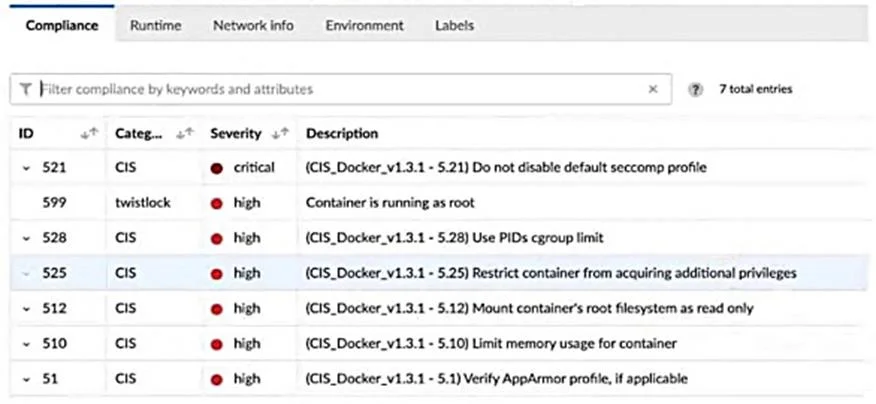
A container and image compliance rule has been configured by enabling all checks; however, upon review, the container's compliance view reveals only the entries in the image below. What is the…
The correct answer is B. Change the rule options to list both failed and passed checks in the compliance rule edit window. When the compliance view shows fewer entries than expected, the rule must be configured to display both passed and failed checks, not just failures.
Question
A container and image compliance rule has been configured by enabling all checks; however, upon review, the container's compliance view reveals only the entries in the image below. What is the appropriate action to take next?
Exhibit
Options
- ADeploy defenders to scan complete container compliance.
- BChange the rule options to list both failed and passed checks in the compliance rule edit window.
- CWait until Prisma Cloud finishes the compliance scan and recheck.
- DChange the rule options to list only failed checks in the compliance rule edit window.
How the community answered
(24 responses)- A17% (4)
- B71% (17)
- C8% (2)
- D4% (1)
Why each option
When the compliance view shows fewer entries than expected, the rule must be configured to display both passed and failed checks, not just failures.
Defenders are already in place since compliance data is showing at all; deploying additional defenders does not change the display filter that limits visible results.
By default, Prisma Cloud compliance rules can be configured to surface only failed checks, which causes the compliance view to appear incomplete even when all checks are enabled on the rule. Changing the rule options to list both failed and passed checks ensures the full set of compliance check results is visible in the UI. This is a display configuration on the rule itself, separate from whether the checks are enabled or whether defenders are scanning.
Waiting is not appropriate because the scan has already run - the issue is a rule display configuration, not a pending scan.
Listing only failed checks is likely the current state causing the incomplete view; changing to only failed checks would not resolve the problem of missing entries.
Concept tested: Prisma Cloud compliance rule display filter configuration
Source: https://docs.prismacloud.io/en/compute-edition/32/admin-guide/compliance/compliance-explorer
Topics
Community Discussion
No community discussion yet for this question.