
NSK101 · Question #73
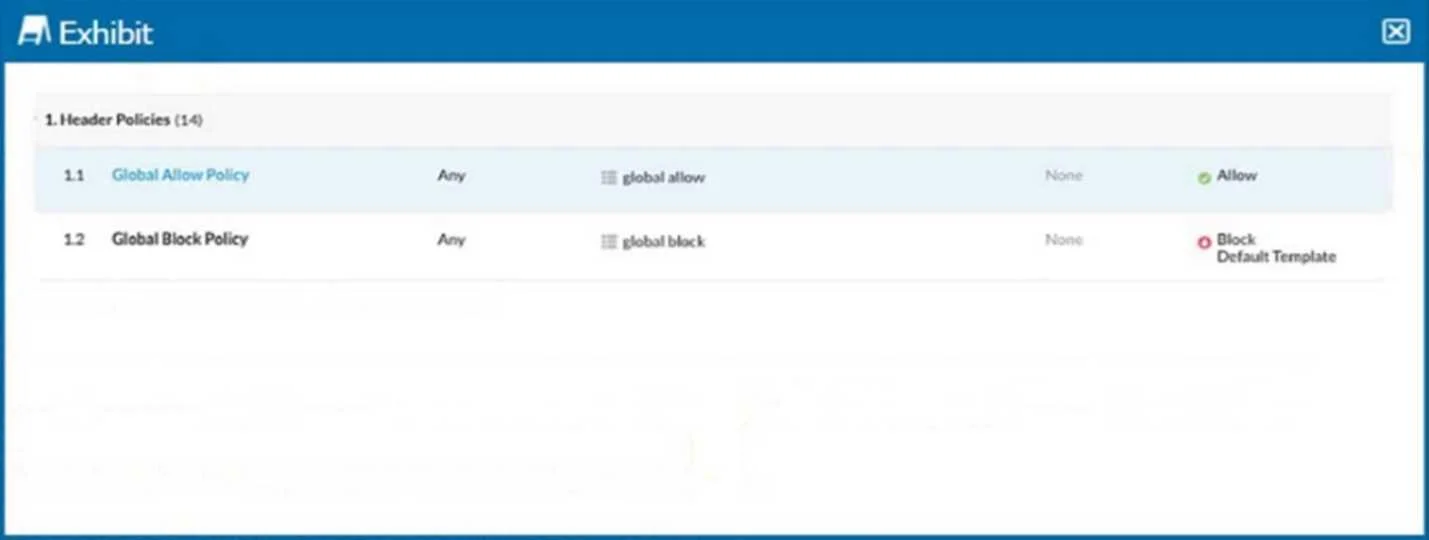
Referring to the exhibit, you have a user reporting that a blocked website is needed for legitimate business reasons. Upon review, you determine that the user has been blocked by the Global Block…
The correct answer is B. Create a custom category with the custom URL list as an included URL list and add it to an allow C. Add the custom URL list as an excluded URL list to the category in the Global Allow policy. Identify the Blocked Policy: According to the exhibit, the website is blocked by the "Global Block Create a Custom URL List: To create an exception for the domain, you need to first create a custom URL list that includes the domain in question. Navigate to the URL List section…
Question
Referring to the exhibit, you have a user reporting that a blocked website is needed for legitimate business reasons. Upon review, you determine that the user has been blocked by the Global Block policy. You need to create an exception forthat domain. You create a custom URL list that includes the domain. In this scenario, which two actions would allow this access? (Choose two.)
Exhibit
Options
- ACreate a custom category with the custom URL list as an included URL list and add it to an allow
- BCreate a custom category with the custom URL list as an included URL list and add it to an allow
- CAdd the custom URL list as an excluded URL list to the category in the Global Allow policy.
- DAdd the custom URL list as an excluded URL list to the category in the Global Block policy.
How the community answered
(18 responses)- A17% (3)
- B72% (13)
- D11% (2)
Explanation
Identify the Blocked Policy: According to the exhibit, the website is blocked by the "Global Block Create a Custom URL List: To create an exception for the domain, you need to first create a custom URL list that includes the domain in question. Navigate to the URL List section in the Netskope UI. Create a new URL list and add the domain that needs to be allowed. Option B: Create a custom category with the custom URL list as an included URL list and add it to an allow policy above the Global Block policy. Go to the Policy section in the Netskope UI. Create a new policy, ensuring it is an "Allow" policy. Add the custom category to this allow policy. Position this allow policy above the Global Block policy to ensure it takes precedence. This ensures that the URLs in the custom list are allowed before the Global Block policy is evaluated. Option C: Add the custom URL list as an excluded URL list to the category in the Global Block Edit the existing Global Block policy. Add the custom URL list to the excluded URL list section of this policy. This will exclude the URLs in the custom list from being blocked by the Global Block policy.
Topics
Community Discussion
No community discussion yet for this question.