
NSE8_810 · Question #27
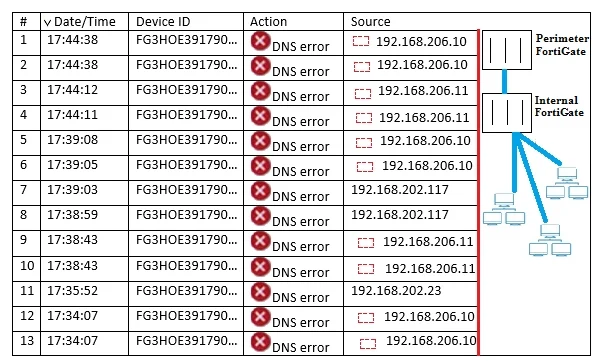
Click the Exhibit button. You have deployed several perimeter FortiGates with internal segmentation FortiGates behind them. All FortiGate devices are logging to FortiAnalyzer. When you search the…
Sign in or unlock NSE8_810 to reveal the answer and full explanation for question #27. The question stem and answer options stay visible for context.
Question
Click the Exhibit button. You have deployed several perimeter FortiGates with internal segmentation FortiGates behind them. All FortiGate devices are logging to FortiAnalyzer. When you search the logs in FortiAnalyzer for denied traffic, you see numerous log messages, as shown in the exhibit, on your perimeter FortiGates only. Which two actions would reduce the number of these log messages? (Choose two.)
Exhibit
Options
- AApply an application control profile to the perimeter FortiGates that does not inspect DNS traffic to the outbound firewall policy.
- BConfigure the internal FortiGates to communicate to FortiGates using port 8888.
- CDisable DNS events logging from FortiGate in the config log fortianalyzer filter section.
- DRemove DNS signatures from the IPS profile applied to the outbound firewall policy.
Unlock NSE8_810 to see the answer
You've previewed enough free NSE8_810 questions. Unlock NSE8_810 for full answers, explanations, the timed quiz mode, progress tracking, and the master PDF. Question stem and options stay visible so you can still see what's on the exam.