
Fortinet
NSE8_810 · Question #14
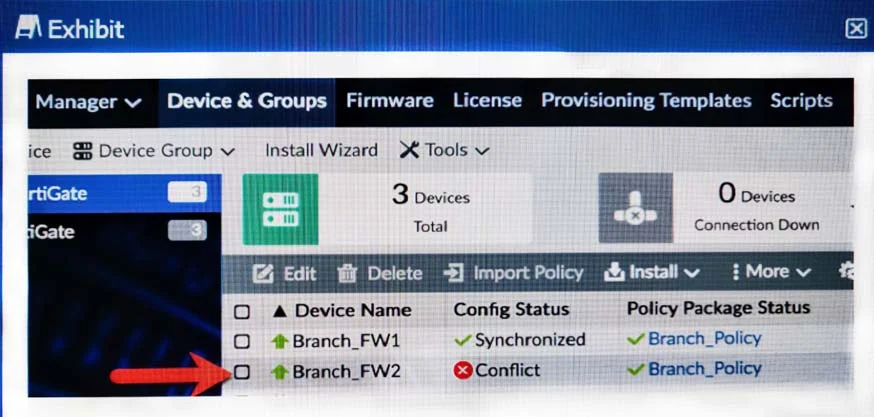
Click the Exhibit button. You log into FortiManager, look at the Device Manager window and notice that one of your managed devices is not in normal status. Referring to the exhibit, which two…
Sign in or unlock NSE8_810 to reveal the answer and full explanation for question #14. The question stem and answer options stay visible for context.
ZTA Management and Monitoring
Question
Click the Exhibit button. You log into FortiManager, look at the Device Manager window and notice that one of your managed devices is not in normal status. Referring to the exhibit, which two statements correctly describe the affected device’s status and result? (Choose two.)
Exhibit
Options
- AThe device configuration was changed on the local FortiGate side only; auto-update is disabled.
- BThe device configuration was changed on both the local FortiGate side and the FortiManager side; auto-update is disabled.
- CThe changed configuration on the FortiGate will remain the next time that the device configuration is pushed form FortiManager.
- DThe changed configuration on the FortiGate will be overwritten in favor of what is on the FortiManager the next time that the device configuration is pushed.
Unlock NSE8_810 to see the answer
You've previewed enough free NSE8_810 questions. Unlock NSE8_810 for full answers, explanations, the timed quiz mode, progress tracking, and the master PDF. Question stem and options stay visible so you can still see what's on the exam.
Topics
#FortiManager#device status#configuration sync#auto-update