
NSE7_SOC_AR-7.6 · Question #30
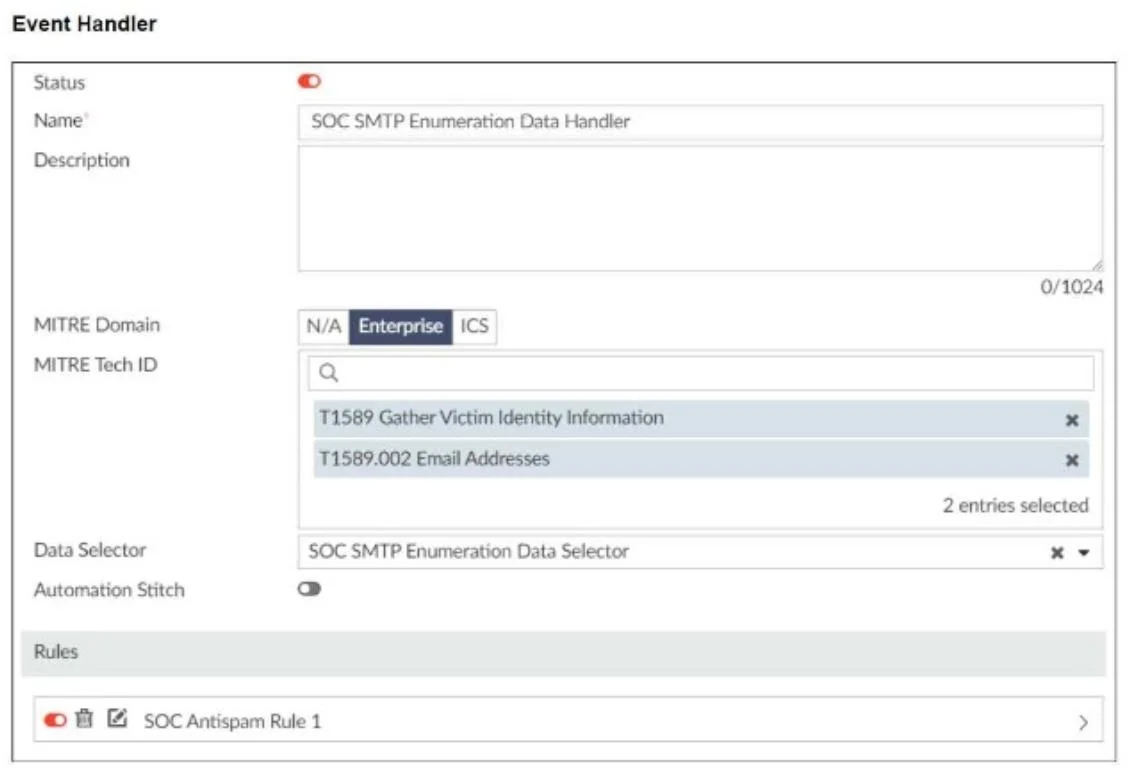
Refer to the exhibits. You configured a custom event handler and an associated rule to generate events whenever FortiMail detects spam emails. However, you notice that the event handler is…
The correct answer is B. In the Log filter by Text field, type type==spam. From the exhibit, we see that: - You have a custom event handler for detecting SMTP enumeration via spam. - The event handler is working, but it's triggering on both spam and clean emails. - This clearly points to a filtering issue in the rule logic. The Log filter by Text…
Question
Refer to the exhibits. You configured a custom event handler and an associated rule to generate events whenever FortiMail detects spam emails. However, you notice that the event handler is generating events for both spam emails and clean emails. Which change must you make in the rule so that it detects only spam emails?
Exhibit
Options
- AIn the Log Type field, select Anti-Spam Log (spam)
- BIn the Log filter by Text field, type type==spam.
- CDisable the rule to use the filter in the data selector to create the event.
- DIn the Trigger an event when field, select Within a group, the log field Spam Name (snane) has
How the community answered
(39 responses)- A5% (2)
- B77% (30)
- C5% (2)
- D13% (5)
Explanation
From the exhibit, we see that: - You have a custom event handler for detecting SMTP enumeration via spam. - The event handler is working, but it's triggering on both spam and clean emails. - This clearly points to a filtering issue in the rule logic. The Log filter by Text field allows you to specify criteria to match logs, such as matching a field Using the filter type==spam ensures that only logs classified as spam are considered. This is a precise and effective method to ensure the rule ignores clean email logs and only triggers on spam-related events.
Topics
Community Discussion
No community discussion yet for this question.