
NSE7_EFW-7.2 · Question #52
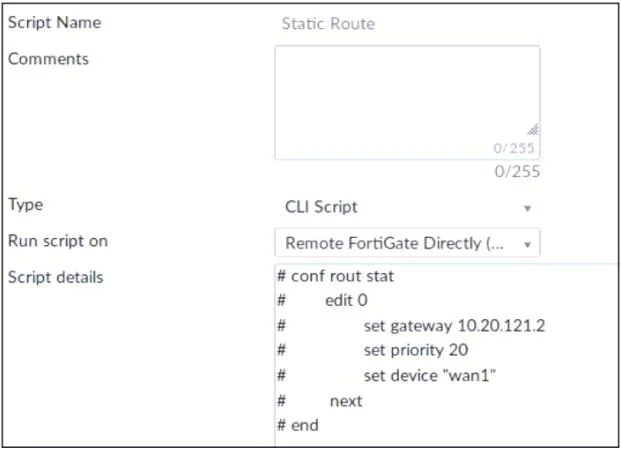
Refer to the exhibit, which contains a CLI script configuration on FortiManager. An administrator configured the CLI script on FortiManager, but the script failed to apply any changes to the managed…
The correct answer is A. The commands that start with the # sign did not run. B. Incomplete commands can cause CLI scripts to fail. When Creating CLI scripts, follow these best practices: 1) Use complete FortiOS CLI commands. 2) Comment lines that start with the number sign (#) do not run. 3) Ensure you set the console output to standard.
Question
Refer to the exhibit, which contains a CLI script configuration on FortiManager. An administrator configured the CLI script on FortiManager, but the script failed to apply any changes to the managed device after being executed. What are two reasons why the script did not make any changes to the managed device? (Choose two)
Exhibit
Options
- AThe commands that start with the # sign did not run.
- BIncomplete commands can cause CLI scripts to fail.
- CStatic routes can be added using only TCI scripts.
- DCLI scripts must start with #!.
How the community answered
(43 responses)- A79% (34)
- C7% (3)
- D14% (6)
Explanation
When Creating CLI scripts, follow these best practices: 1) Use complete FortiOS CLI commands. 2) Comment lines that start with the number sign (#) do not run. 3) Ensure you set the console output to standard.
Topics
Community Discussion
No community discussion yet for this question.