
NSE7_EFW-7.2 · Question #5
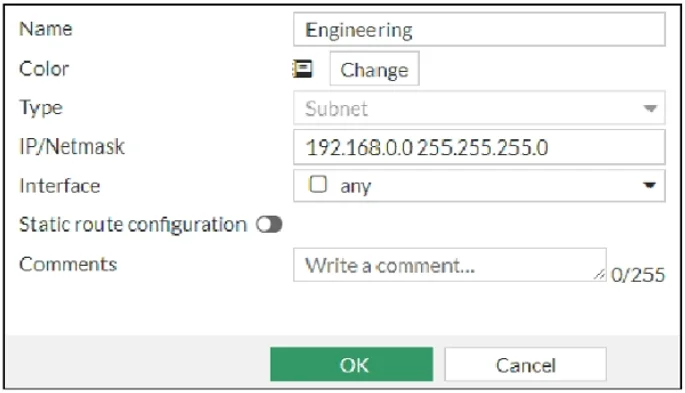
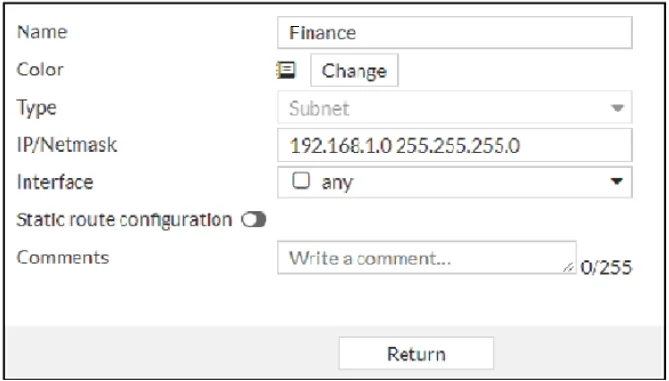
Refer to the exhibits, which show the configurations of two address objects from the same FortiGate. Engineering address object Finance address object Why can you modify the Engineering address…
The correct answer is C. FortiGate joined the Security Fabric and the Finance address object was configured on the root. In workspace mode the "OK" button is present, you get an error message as soon as you click on When you create a fabric object on a root device, it will synchronize to the downstream devices (if enable) and you will not be able to modify the object on any downstream devices…
Question
Refer to the exhibits, which show the configurations of two address objects from the same FortiGate. Engineering address object Finance address object Why can you modify the Engineering address object, but not the Finance address object?
Exhibits
Options
- AYou have read-only access.
- BAnother user is editing the Finance address object in workspace mode.
- CFortiGate joined the Security Fabric and the Finance address object was configured on the root
- DFortiGate is registered on FortiManager.
How the community answered
(58 responses)- A3% (2)
- B12% (7)
- C78% (45)
- D7% (4)
Explanation
In workspace mode the "OK" button is present, you get an error message as soon as you click on When you create a fabric object on a root device, it will synchronize to the downstream devices (if enable) and you will not be able to modify the object on any downstream devices. The "OK" button will NOT be available on downstream devices.
Topics
Community Discussion
No community discussion yet for this question.