
NSE6_SDW_AD-7.6 · Question #79
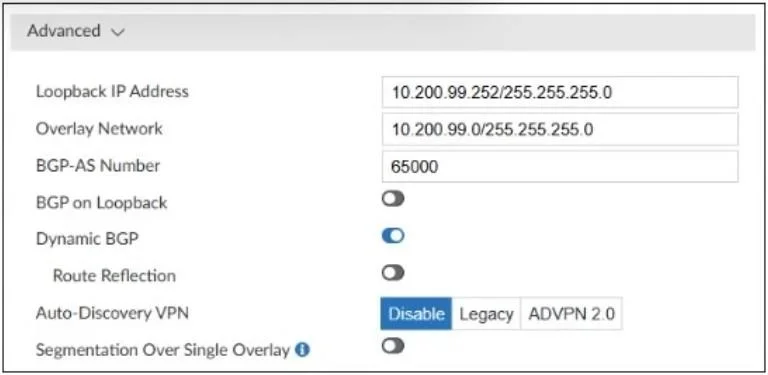
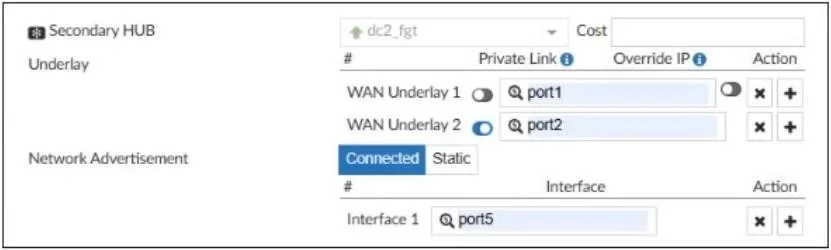
Refer to the exhibits. SD-WAN overlay template advanced settings Underlay and network advertisement configuration The SD-WAN overlay template, advanced settings, and the underlay and network…
The correct answer is B. FortiManager will create an overlay tunnel on the port2 interface. D. FortiManager will create an overlay tunnel on the port1 interface. In the SD-WAN overlay orchestrator, the interfaces defined under Underlay (WAN Underlay 1 = port1, WAN Underlay 2 = port2) are used as the physical underlay over which IPsec/overlay tunnels are built. Therefore, FortiManager will create overlay tunnels on port1 and port2.
Question
Refer to the exhibits. SD-WAN overlay template advanced settings Underlay and network advertisement configuration The SD-WAN overlay template, advanced settings, and the underlay and network advertisement settings are shown. These are the configurations for the secondary hub of a dual-hub SD-WAN topology created with the FortiManager SD-WAN overlay orchestrator. Which two conclusions can you draw from the information shown in the exhibits? (Choose two.)
Exhibits
Options
- AFortiManager will define port5 as a BGP neighbor.
- BFortiManager will create an overlay tunnel on the port2 interface.
- CFortiManager will define port2 as a BGP neighbor.
- DFortiManager will create an overlay tunnel on the port1 interface.
How the community answered
(43 responses)- A26% (11)
- B63% (27)
- C12% (5)
Explanation
In the SD-WAN overlay orchestrator, the interfaces defined under Underlay (WAN Underlay 1 = port1, WAN Underlay 2 = port2) are used as the physical underlay over which IPsec/overlay tunnels are built. Therefore, FortiManager will create overlay tunnels on port1 and port2.
Topics
Community Discussion
No community discussion yet for this question.