
NSE6_SDW_AD-7.6 · Question #75
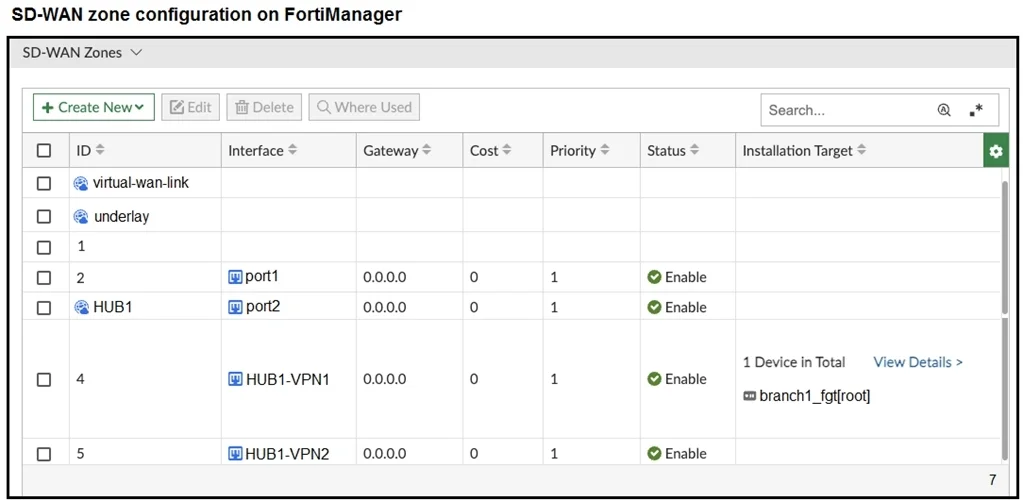
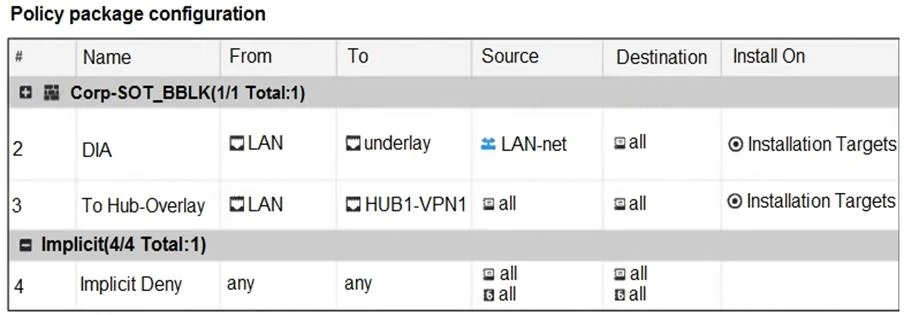
Refer to the exhibits. The exhibits show the SD-WAN zone configuration of an SD-WAN template prepared on FortiManager and the policy package configuration. When the administrator tries to install…
The correct answer is B. Configure HUB1 as the destination of policy 3. Policy 3 points traffic To = HUB1-VPN1, which is an SD-WAN member interface. In SD-WAN you must reference the SD-WAN zone (the logical interface) in policies, not its member tunnels. Change the policy's To interface to the zone HUB1, and the install will succeed.
Question
Refer to the exhibits. The exhibits show the SD-WAN zone configuration of an SD-WAN template prepared on FortiManager and the policy package configuration. When the administrator tries to install the configuration changes, FortiManager fails to commit. What should the administrator do to fix the issue?
Exhibits
Options
- AConfigure branch1_fgt as the installation target for policy 3.
- BConfigure HUB1 as the destination of policy 3.
- CConfigure a normalized interface for the IPsec tunnel HUB1-VPN1.
- DConfigure both HUB1-VPN1 and HUB1-VPN2 as the destination of policy 3.
How the community answered
(51 responses)- A8% (4)
- B73% (37)
- C16% (8)
- D4% (2)
Explanation
Policy 3 points traffic To = HUB1-VPN1, which is an SD-WAN member interface. In SD-WAN you must reference the SD-WAN zone (the logical interface) in policies, not its member tunnels. Change the policy's To interface to the zone HUB1, and the install will succeed.
Topics
Community Discussion
No community discussion yet for this question.