
Fortinet
NSE6_FWB-6.4 · Question #42
Refer to the exhibit. FortiWeb is configured to block traffic from Japan to your web application server. However, in the logs, the administrator is seeing traffic allowed from one particular IP…
The correct answer is B. If the IP address is configured as a geo reputation exception, remove it. C. Configure the IP address as a blacklisted IP address. You've hit your limit · resets 5am (America/New_York)
Policy Configuration and Web Application Protection
Question
Refer to the exhibit. FortiWeb is configured to block traffic from Japan to your web application server. However, in the logs, the administrator is seeing traffic allowed from one particular IP address which is geo-located in Japan. What can the administrator do to solve this problem? (Choose two.)
Exhibit
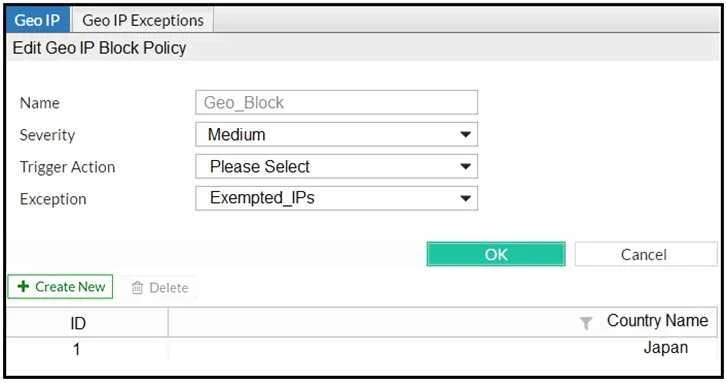
Options
- AManually update the geo-location IP addresses for Japan.
- BIf the IP address is configured as a geo reputation exception, remove it.
- CConfigure the IP address as a blacklisted IP address.
- DIf the IP address is configured as an IP reputation exception, remove it.
How the community answered
(39 responses)- A33% (13)
- B49% (19)
- D18% (7)
Explanation
You've hit your limit · resets 5am (America/New_York)
Topics
#geo-blocking#IP reputation#exception lists#blacklist
Community Discussion
No community discussion yet for this question.