
Fortinet
NSE6_FML-6.4 · Question #3
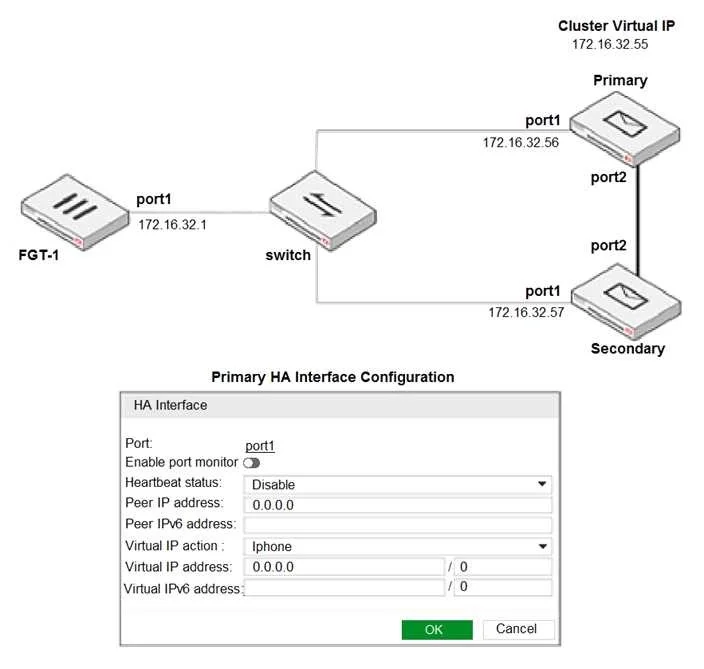
Refer to the exhibit. The exhibit shows a FortiMail active-passive setup. Which three actions are recommended when configuring the primary FortiMail HA interface? (Choose three.)
The correct answer is A. Disable Enable port monitor B. In the Heartbeat status drop-down list, select Primary D. In the Virtual IP action drop-down list, select Use. Explanation/Reference:
FortiMail deployment and administration
Question
Refer to the exhibit. The exhibit shows a FortiMail active-passive setup. Which three actions are recommended when configuring the primary FortiMail HA interface? (Choose three.)
Exhibit
Options
- ADisable Enable port monitor
- BIn the Heartbeat status drop-down list, select Primary
- CIn the Peer IP address field, type 172.16.32.57
- DIn the Virtual IP action drop-down list, select Use
- EIn the Virtual IP address field, type 172.16.32.55/24
How the community answered
(13 responses)- A69% (9)
- C8% (1)
- E23% (3)
Explanation
Explanation/Reference:
Topics
#HA configuration#active-passive#virtual IP#heartbeat
Community Discussion
No community discussion yet for this question.