
NSE5_FSM-6.3 · Question #41
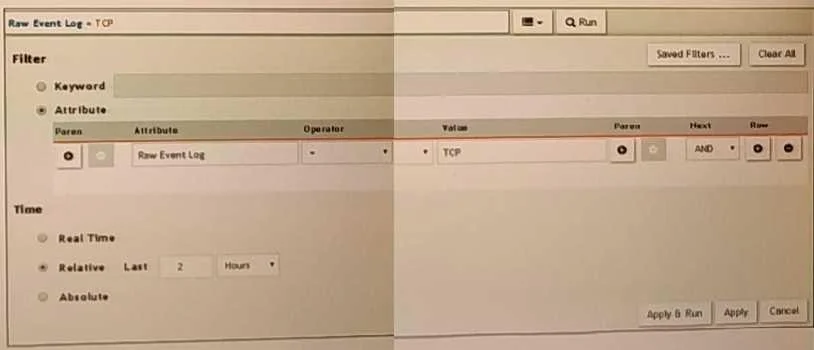
Refer to the exhibit. A FortiSIEM is continuously receiving syslog events from a FortiGate firewall. The FortiSlfcM administrator is trying to search the raw event logs for the last two hours that…
The correct answer is A. The keyword is case sensitive Instead of typing TCP in the Value field. the administrator should. Case Sensitivity in Searches: In FortiSIEM, search queries, including those for raw event logs, are case sensitive. This means that keywords must be entered exactly as they appear in the logs. Keyword Mismatch: The exhibit shows the keyword "TCP" in the Value field. If the…
Question
Refer to the exhibit. A FortiSIEM is continuously receiving syslog events from a FortiGate firewall. The FortiSlfcM administrator is trying to search the raw event logs for the last two hours that contain the keyword tcp. However, the administrator is getting no results from the search. Based on the selected filters shown in the exhibit, why are there no search results?
Exhibit
Options
- AThe keyword is case sensitive Instead of typing TCP in the Value field. the administrator should
- BIn the Time section, the administrator selected the Relative Last option, and in the drop-down
- CThe administrator selected - in the Operator column That a the wrong operator.
- DThe administrator selected AND in the Next drop-down list. This is the wrong boolean operator.
How the community answered
(34 responses)- A71% (24)
- B18% (6)
- C9% (3)
- D3% (1)
Explanation
Case Sensitivity in Searches: In FortiSIEM, search queries, including those for raw event logs, are case sensitive. This means that keywords must be entered exactly as they appear in the logs. Keyword Mismatch: The exhibit shows the keyword "TCP" in the Value field. If the actual events use "tcp" (lowercase), the search will return no results because of the case mismatch. Correct Keyword: To match the keyword correctly, the administrator should enter "tcp" in the
Topics
Community Discussion
No community discussion yet for this question.