
NSE5_FSM-6.3 · Question #17
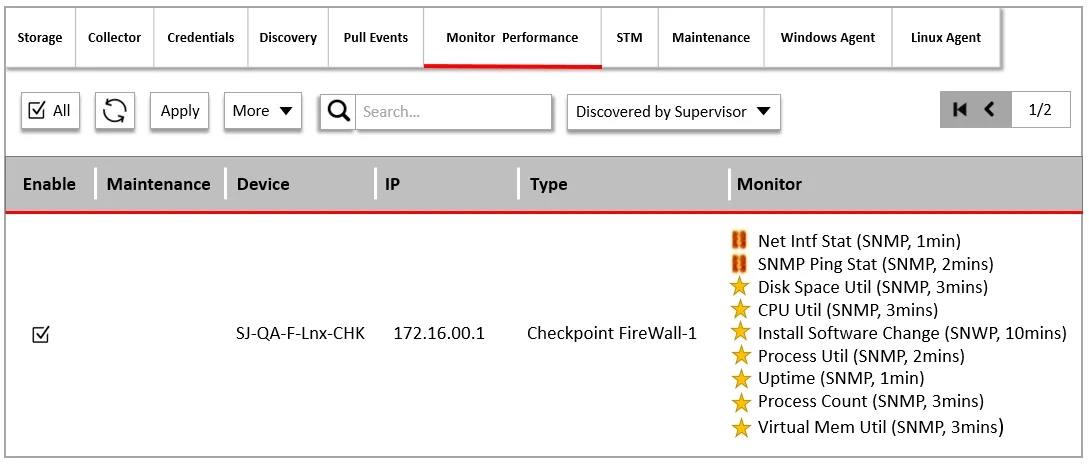
Refer to the exhibit. What do the yellow stars listed in the Monitor column indicate?
The correct answer is A. A yellow star indicates that a metric was applied during discovery, and data has been collected. Monitor Column Indicators: In FortiSIEM, the Monitor column displays the status of various metrics applied during the discovery process. Yellow Star Meaning: A yellow star next to a metric indicates that the metric was successfully applied during discovery and data has been…
Question
Refer to the exhibit. What do the yellow stars listed in the Monitor column indicate?
Exhibits
Options
- AA yellow star indicates that a metric was applied during discovery, and data has been collected
- BA yellow star indicates that a metric was applied during discovery, but data collection has not
- CA yellow star indicates that a metric was applied during discovery, but FortiSIEM is unable to
- DA yellow star indicates that a metric was not applied during discovery and, therefore, FortiSEIM
How the community answered
(24 responses)- A83% (20)
- C13% (3)
- D4% (1)
Explanation
Monitor Column Indicators: In FortiSIEM, the Monitor column displays the status of various metrics applied during the discovery process. Yellow Star Meaning: A yellow star next to a metric indicates that the metric was successfully applied during discovery and data has been collected for that metric. Successful Data Collection: This visual indicator helps administrators quickly identify which metrics are active and have data available for analysis.
Topics
Community Discussion
No community discussion yet for this question.