
NSE5_FMG-7.2 · Question #52
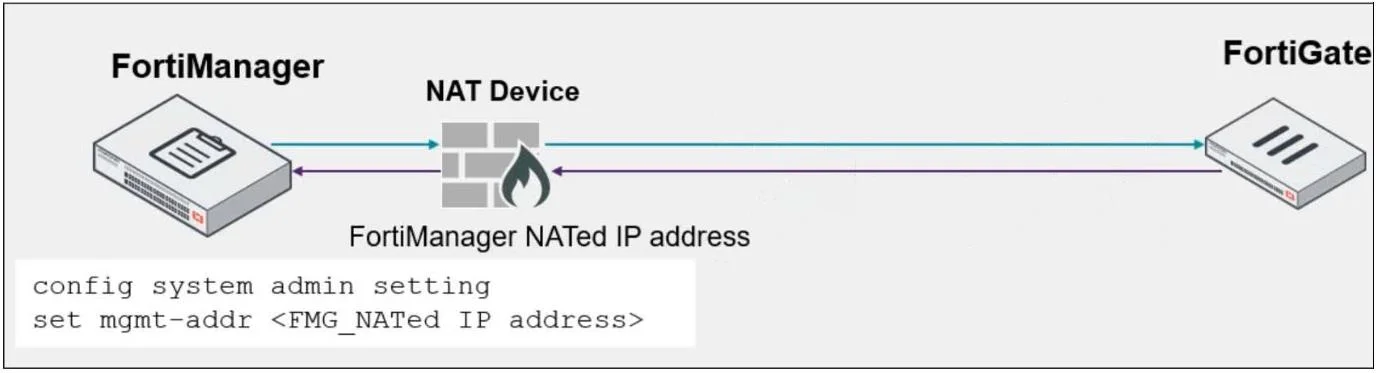
Refer to the exhibit. An administrator is about to add the FortiGate device to FortiManager using the discovery process. FortiManager is operating behind a NAT device, and the administrator…
The correct answer is B. During discovery, FortiManager sets the FortiManager NATed IP address on FortiGate. You can configure the FortiManger NATed IP address on FortiGate under the central management configuration. This allows FortiGate to announce itself to FortiManager and try to re- establish the FGFM tunnel, if it is torn down. Configuring the FortiManager NATed IP address on…
Question
Refer to the exhibit. An administrator is about to add the FortiGate device to FortiManager using the discovery process. FortiManager is operating behind a NAT device, and the administrator configured the FortiManager NATed IP address under the FortiManager system administration settings. What is the expected result?
Exhibit
Options
- ADuring discovery, FortiManager uses only the FortiGate serial number to establish the connection.
- BDuring discovery, FortiManager sets the FortiManager NATed IP address on FortiGate.
- CDuring discovery, FortiManager sets the NATed device IP address on FortiGate.
- DDuring discovery, FortiManager sets both the FortiManager NATed IP address and NAT device IP
How the community answered
(38 responses)- A3% (1)
- B79% (30)
- C13% (5)
- D5% (2)
Explanation
You can configure the FortiManger NATed IP address on FortiGate under the central management configuration. This allows FortiGate to announce itself to FortiManager and try to re- establish the FGFM tunnel, if it is torn down. Configuring the FortiManager NATed IP address on FortiGate allows both FortiManager and FortiGate to re-establish the FGFM tunnel. Also, if you configure the FortiManager NATed IP address under the FortiManager system administrator settings, FortiManager sets this address on FortiGate during the discovery process.
Topics
Community Discussion
No community discussion yet for this question.