
NSE5_FMG-7.2 · Question #32
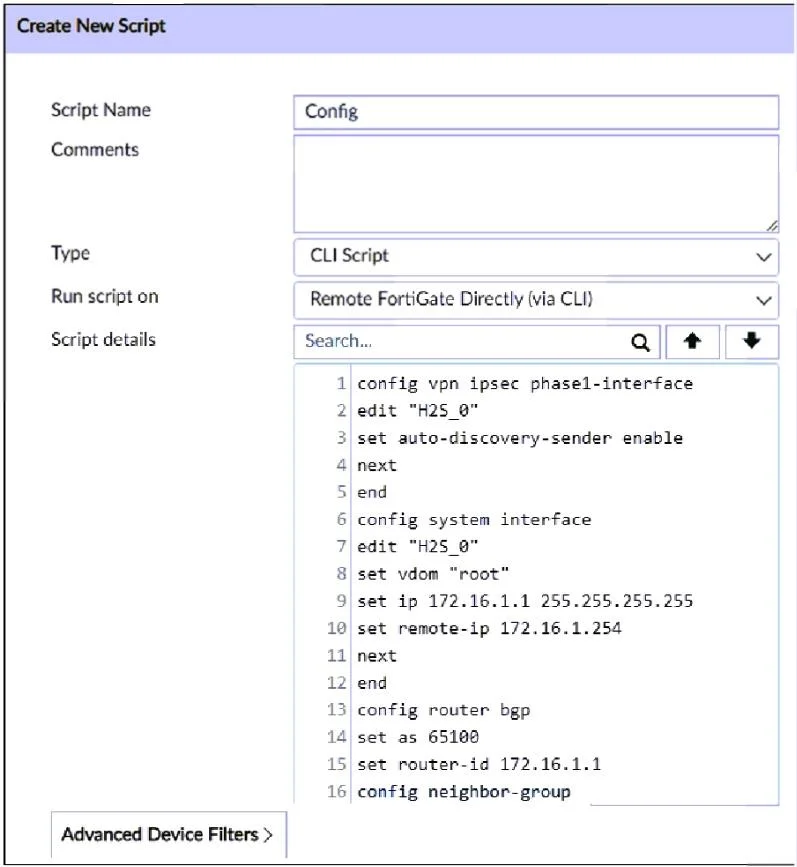
Refer to the exhibit. What will happen if the script is run using the Remote FortiGate Directly (via CLI) option? (Choose two.)
The correct answer is B. FortiManager will create a new revision history. C. FortiGate will auto-update the FortiManager device-level database. Remote FortiGate Directly (through the CLI): A script can be executed directly on the device and you don't need to install the changes using the installation wizard. As the changes are directly installed on the managed device, no option is provided to verify and check the…
Question
Refer to the exhibit. What will happen if the script is run using the Remote FortiGate Directly (via CLI) option? (Choose two.)
Exhibit
Options
- AFortiManager provides a preview of CLI commands before executing this script on a managed
- BFortiManager will create a new revision history.
- CFortiGate will auto-update the FortiManager device-level database.
- DYou must install these changes using the Install Wizard.
How the community answered
(59 responses)- A5% (3)
- B83% (49)
- D12% (7)
Explanation
Remote FortiGate Directly (through the CLI): A script can be executed directly on the device and you don't need to install the changes using the installation wizard. As the changes are directly installed on the managed device, no option is provided to verify and check the configuration changes through FortiManager prior to executing it.
Topics
Community Discussion
No community discussion yet for this question.