
NSE5_FMG-7.0 · Question #51
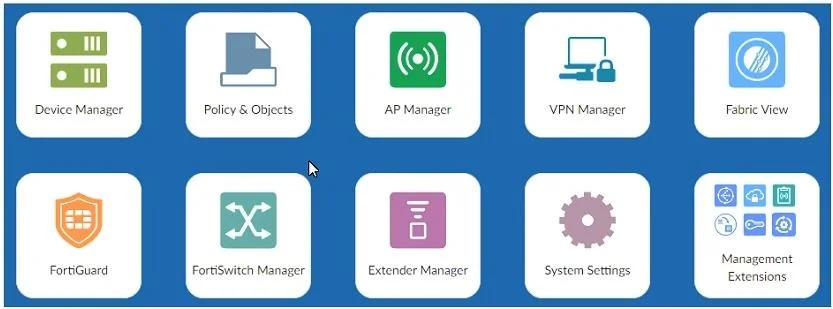
Refer to the exhibit. An administrator logs into the FortiManager GUI and sees the panes shown in the exhibit. Which two reasons can explain why the FortiAnalyzer feature panes do not appear?…
The correct answer is B. The administrator profile does not have full access privileges like the Super_User profile. D. FortiAnalyzer features are not enabled on FortiManager. B: Permissions for FAZ panes are detailed in the Admin profiles. Example: "Standard user" has read/write access to FortiView, Log View, Incidents & Events, Reports while "Package user" D: You need to manage FAZ from FortiManager to have access to FAZ features.
Question
Refer to the exhibit. An administrator logs into the FortiManager GUI and sees the panes shown in the exhibit. Which two reasons can explain why the FortiAnalyzer feature panes do not appear? (Choose two.)
Exhibit
Options
- AThe administrator logged in using the unsecure protocol HTTP, so the view is restricted.
- BThe administrator profile does not have full access privileges like the Super_User profile.
- CThe administrator IP address is not a part of the trusted hosts configured on FortiManager
- DFortiAnalyzer features are not enabled on FortiManager.
How the community answered
(23 responses)- A4% (1)
- B83% (19)
- C13% (3)
Explanation
B: Permissions for FAZ panes are detailed in the Admin profiles. Example: "Standard user" has read/write access to FortiView, Log View, Incidents & Events, Reports while "Package user" D: You need to manage FAZ from FortiManager to have access to FAZ features.
Topics
Community Discussion
No community discussion yet for this question.