
NSE4_FGT-7.0 · Question #70
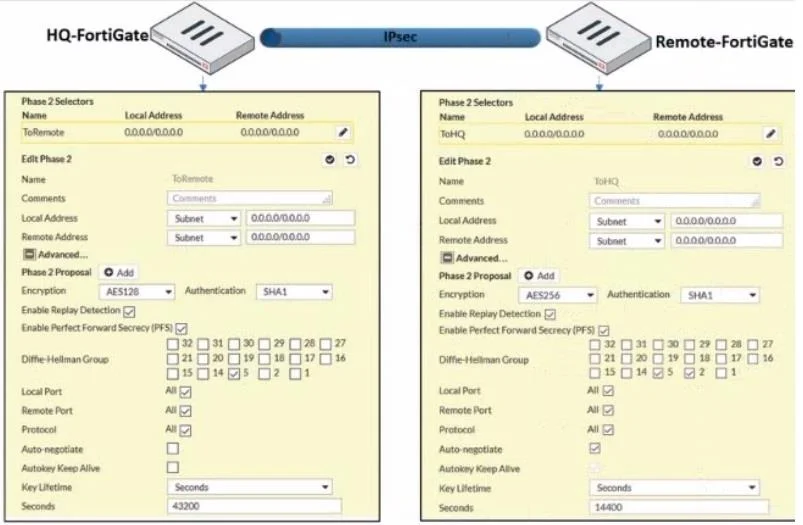
Refer to the exhibit. A network administrator is troubleshooting an IPsec tunnel between two FortiGate devices. The administrator has determined that phase 1 status is up. but phase 2 fails to come…
The correct answer is D. On HQ-FortiGate, set Encryption to AES256. A common reason for IPsec Phase 2 failure when Phase 1 is up is a mismatch in the Phase 2 encryption or authentication algorithms between the two VPN peers.
Question
Refer to the exhibit. A network administrator is troubleshooting an IPsec tunnel between two FortiGate devices. The administrator has determined that phase 1 status is up. but phase 2 fails to come up. Based on the phase 2 configuration shown in the exhibit, what configuration change will bring phase 2 up?
Exhibit
Options
- AOn HQ-FortiGate,enable Auto-negotiate.
- BOn Remote-FortiGate, set Seconds to 43200.
- COn HQ-FortiGate,enable Diffie-Hellman Group 2.
- DOn HQ-FortiGate, set Encryption to AES256.
How the community answered
(26 responses)- A8% (2)
- B4% (1)
- C4% (1)
- D85% (22)
Why each option
A common reason for IPsec Phase 2 failure when Phase 1 is up is a mismatch in the Phase 2 encryption or authentication algorithms between the two VPN peers.
Enabling Auto-negotiate on HQ-FortiGate might help if multiple proposals exist, but it's not a direct fix for a specific, known mismatch in a single critical parameter like the encryption algorithm without ensuring AES256 is included in the proposals.
If the Remote-FortiGate's Phase 2 is configured for AES256 encryption, the HQ-FortiGate's Phase 2 configuration must also use AES256 encryption to establish the tunnel. A mismatch in encryption algorithms, such as one side using AES128 and the other AES256, will prevent Phase 2 from coming up, even if Phase 1 successfully negotiated.
Concept tested: IPsec VPN Phase 2 parameter matching
Source: https://docs.fortinet.com/document/fortigate/7.4.0/administration-guide/102061/phase-2-settings
Topics
Community Discussion
No community discussion yet for this question.