
NSE4 · Question #50
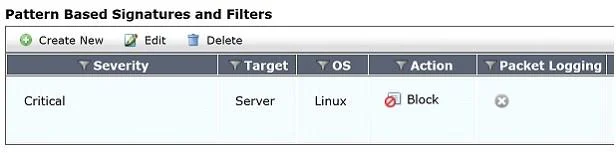
Review the IPS sensor filter configuration shown in the exhibit Based on the information in the exhibit, which statements are correct regarding the filter? (Choose two.)
The correct answer is C. Its action will block traffic matching these signatures. D. It only takes effect when the sensor is applied to a policy. The IPS sensor filter configuration is set to block traffic matching its signatures, and this filter will only become active when the sensor is applied to an appropriate firewall policy.
Question
Review the IPS sensor filter configuration shown in the exhibit Based on the information in the exhibit, which statements are correct regarding the filter? (Choose two.)
Exhibit
Options
- AIt does not log attacks targeting Linux servers.
- BIt matches all traffic to Linux servers.
- CIts action will block traffic matching these signatures.
- DIt only takes effect when the sensor is applied to a policy.
How the community answered
(62 responses)- A5% (3)
- B11% (7)
- C84% (52)
Why each option
The IPS sensor filter configuration is set to block traffic matching its signatures, and this filter will only become active when the sensor is applied to an appropriate firewall policy.
Without the exhibit, it's impossible to determine if the filter explicitly excludes logging for attacks targeting Linux servers; it might log all detected attacks or have specific logging settings.
An IPS filter typically targets specific attack signatures, vulnerabilities, or anomalies, not 'all traffic' to a particular OS type, even if it's configured to detect threats against Linux servers.
IPS sensor filters define the action to be taken when traffic matches a configured signature or anomaly; 'block' is a common action to prevent malicious traffic from passing through the FortiGate.
IPS sensors and their associated filters are not active globally by default; they must be explicitly selected and applied to a firewall policy to inspect and act upon traffic flowing through that policy.
Concept tested: FortiGate IPS sensor filters and policy application
Source: https://docs.fortinet.com/document/fortigate/7.4.0/administration-guide/603408/configuring-ips-profiles
Topics
Community Discussion
No community discussion yet for this question.