
NSE4 · Question #483
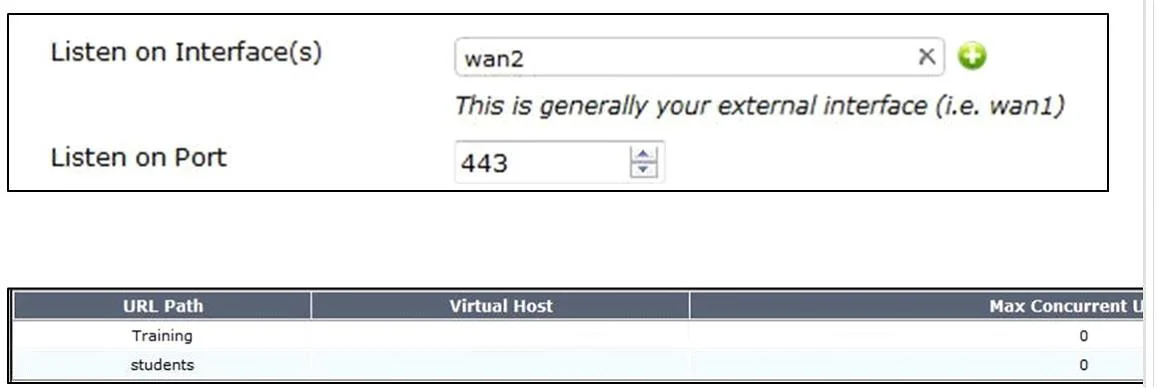
A FortiGate is configured with the 1.1.1.1/24 address on the wan2 interface and HTTPS Administrative Access, using the default tcp port, is enabled for that interface. Given the SSL VPN settings in…
The correct answer is B. https://1.1.1.1:443/STUDENTS D. https://1.1.1.1/. Valid SSL VPN login portal URLs for a FortiGate include https://1.1.1.1:443/STUDENTS for a specific portal named STUDENTS, and https://1.1.1.1/ for the default SSL VPN portal, using the interface's IP and default HTTPS port.
Question
A FortiGate is configured with the 1.1.1.1/24 address on the wan2 interface and HTTPS Administrative Access, using the default tcp port, is enabled for that interface. Given the SSL VPN settings in the exhibit. Which of the following SSL VPN login portal URLs are valid? (Choose two.)
Exhibit
Options
How the community answered
(58 responses)- B83% (48)
- C17% (10)
Why each option
Valid SSL VPN login portal URLs for a FortiGate include `https://1.1.1.1:443/STUDENTS` for a specific portal named STUDENTS, and `https://1.1.1.1/` for the default SSL VPN portal, using the interface's IP and default HTTPS port.
This URL format `https://IP_address:port/portal_name` is correct for accessing a specific SSL VPN portal (e.g., 'STUDENTS'). Since HTTPS administrative access uses the default TCP port 443, explicitly including `:443` is also valid, though often omitted as it's the default.
The path `/login` is not the standard or configurable path for accessing a FortiGate SSL VPN portal; portals are typically accessed at the root or with a specific portal name.
This URL format `https://IP_address/` is the standard way to access the default SSL VPN portal when no specific portal name is appended, and HTTPS typically defaults to port 443.
Concept tested: FortiGate SSL VPN portal URLs
Source: https://docs.fortinet.com/document/fortigate/7.4.0/admin-guide/60225/configuring-ssl-vpn-portals
Topics
Community Discussion
No community discussion yet for this question.