
NSE4 · Question #436
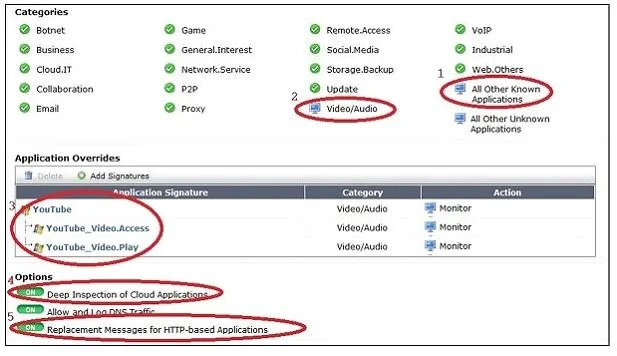
The exhibit is a screen shot of an Application Control profile. Different settings are circled and numbered. Select the number identifying the setting which will provide additional information about…
The correct answer is D. 4. This question asks to identify the setting within an Application Control profile that enables detailed logging for YouTube access, including specific video names.
Question
The exhibit is a screen shot of an Application Control profile. Different settings are circled and numbered. Select the number identifying the setting which will provide additional information about YouTube access, such as the name of the video watched.
Exhibit
Options
- A1
- B2
- C3
- D4
- E5
How the community answered
(55 responses)- A9% (5)
- B2% (1)
- C4% (2)
- D84% (46)
- E2% (1)
Why each option
This question asks to identify the setting within an Application Control profile that enables detailed logging for YouTube access, including specific video names.
Setting 1 likely controls the general action (e.g., allow, block, monitor) for the application, not specific detailed logging.
Setting 2 might relate to the category or specific application ID for YouTube, but not the deep logging of video names.
Setting 3 could be an overall action or policy applied to YouTube traffic, but it doesn't specifically enable video access logging.
Setting 4, representing 'YouTube Access Logging,' is the specific control within an Application Control profile that, when enabled, provides granular details such as the names of videos watched on YouTube. This feature enhances monitoring and auditing of YouTube usage.
Setting 5 would typically represent another action or filter option within the profile, unrelated to the detailed YouTube video logging feature.
Concept tested: FortiGate Application Control YouTube logging
Source: https://docs.fortinet.com/document/fortigate/7.4.0/administration-guide/483664/application-control
Topics
Community Discussion
No community discussion yet for this question.