
NSE4 · Question #297
Which of the following statements are true regarding DLP File Type Filtering? (Choose two.)
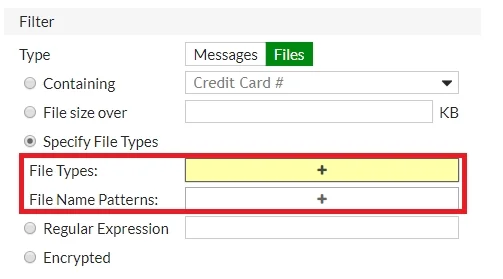
The correct answer is A. Filters based on file extension C. Filters based on file content. FortiGate DLP File Type Filtering identifies files by inspecting their file extensions and by performing deep content analysis to determine the true file type.
Question
Which of the following statements are true regarding DLP File Type Filtering? (Choose two.)
Exhibit
Options
- AFilters based on file extension
- BFilters based on fingerprints
- CFilters based on file content
- DFile types are hard coded in the FortiOS
How the community answered
(31 responses)- A94% (29)
- B3% (1)
- D3% (1)
Why each option
FortiGate DLP File Type Filtering identifies files by inspecting their file extensions and by performing deep content analysis to determine the true file type.
FortiGate DLP can effectively filter files based on their extensions (e.g., .exe, .pdf, .doc), which is a common and straightforward method of classifying file types.
Fingerprinting is a DLP feature used for identifying specific sensitive content (e.g., a specific document) based on its unique digital signature, rather than a method for general 'file type' identification.
Beyond simple extensions, FortiGate DLP also employs 'true file type detection,' which involves examining the file's internal content and header information to accurately identify its actual type, preventing evasion by merely changing an extension.
While FortiGate OS comes with a robust list of recognized file types, this list is dynamically updated via FortiGuard services and can be extended or customized by administrators, meaning they are not 'hard coded' and unchangeable.
Concept tested: DLP file type filtering mechanisms
Source: https://docs.fortinet.com/document/fortigate/7.4.0/administration-guide/20935/dlp-sensors
Topics
Community Discussion
No community discussion yet for this question.