
NSE4 · Question #128
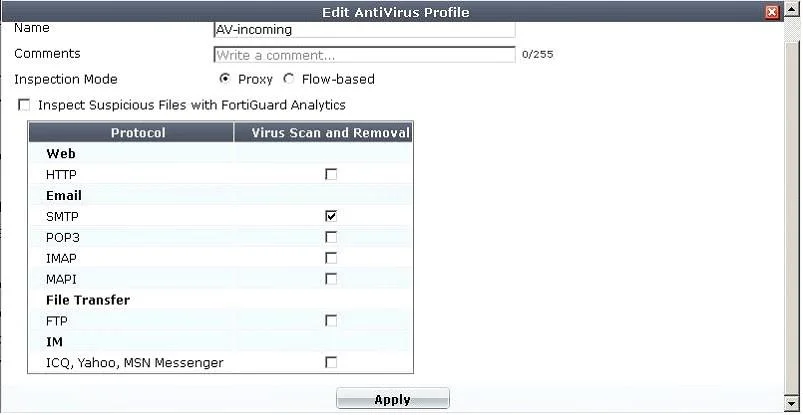
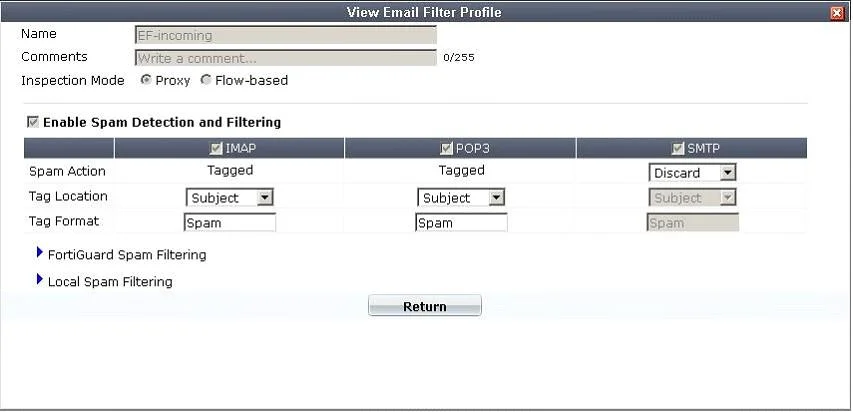
A firewall policy has been configured for the internal email server to receive email from external parties through SMTP. Exhibits A and B show the antivirus and email filter profiles applied to this…
The correct answer is A. The FortiGate unit will remove the infected file and deliver the email with a replacement message. When a FortiGate antivirus engine detects a virus in an email attachment, it typically removes the infected file and delivers the email with a replacement message.
Question
A firewall policy has been configured for the internal email server to receive email from external parties through SMTP. Exhibits A and B show the antivirus and email filter profiles applied to this policy. Exhibit A:
Exhibit B:
What is the correct behavior when the email attachment is detected as a virus by the FortiGate antivirus engine?
Exhibits
Options
- AThe FortiGate unit will remove the infected file and deliver the email with a replacement message
- BThe FortiGate unit will reject the infected email and the sender will receive a failed delivery
- CThe FortiGate unit will remove the infected file and add a replacement message. Both sender and
- DThe FortiGate unit will reject the infected email and notify the sender.
How the community answered
(40 responses)- A80% (32)
- B5% (2)
- C13% (5)
- D3% (1)
Why each option
When a FortiGate antivirus engine detects a virus in an email attachment, it typically removes the infected file and delivers the email with a replacement message.
Standard FortiGate antivirus behavior for email attachments, when configured to 'Remove' or 'Strip', is to remove the malicious file from the email and then allow the cleaned email to be delivered to the recipient, often with a replacement message informing them of the file's removal.
Rejecting the entire infected email and notifying the sender is an action typically reserved for spam or specific content filtering, not the default or primary action for virus-infected attachments where cleaning is possible.
While the FortiGate removes the infected file and adds a replacement message, the replacement message is typically for the recipient and for internal logging, not usually sent back to the original sender.
Rejecting the entire infected email is not the primary action for an attachment virus unless explicitly configured, as the goal is usually to deliver the clean email, and sender notification regarding a replacement message is not standard.
Concept tested: FortiGate antivirus action for email attachments
Source: https://docs.fortinet.com/document/fortigate/7.4.0/administration-guide/359285/antivirus-profiles
Topics
Community Discussion
No community discussion yet for this question.