
Network_Appliance
NS0-171 · Question #94
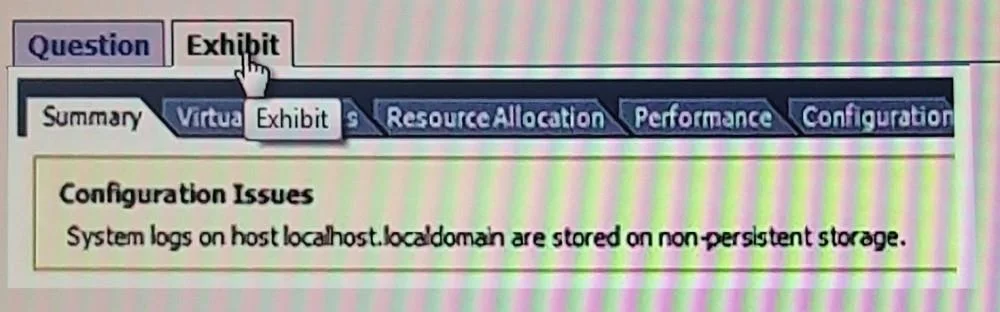
Click the exhibit button. Your vSphere host is booting off an SD and is displaying the error shown in the exhibit. What should you do to correct the problem?
The correct answer is C. Update the current ESXi scratch location. https://kb.vmware.com/selfservice/microsites/search.do?language=en_US&cmd=displayKC&exte
FlexPod Management and Troubleshooting
Question
Click the exhibit button. Your vSphere host is booting off an SD and is displaying the error shown in the exhibit. What should you do to correct the problem?
Exhibit
Options
- AEnable Unified Extensible Firmware Interface (UEFI).
- BEnable SD card mirroring.
- CUpdate the current ESXi scratch location.
- DReinstall ESXi on a larger SD card.
How the community answered
(32 responses)- A9% (3)
- B3% (1)
- C84% (27)
- D3% (1)
Explanation
https://kb.vmware.com/selfservice/microsites/search.do?language=en_US&cmd=displayKC&exte
Topics
#ESXi scratch location#SD card boot#vSphere troubleshooting#boot error
Community Discussion
No community discussion yet for this question.