
Network_Appliance
NS0-171 · Question #83
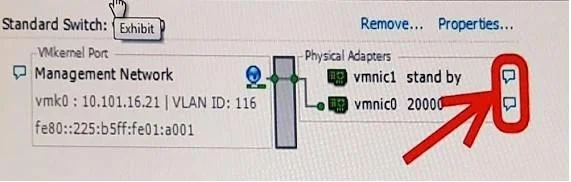
Click the Exhibit button. You have a FlexPod solution with vSphere ESXi. When you click the icons shown in the exhibit, you do not see any network connectivity details. Which Cisco UCS policy type…
The correct answer is C. LAN Connectivity Policy. 2/b_UCSM_GUI_Configuration_Guide_2_2/b_UCSM_GUI_Configuration_Guide_2_2_chapter_0
Cisco UCS Configuration
Question
Click the Exhibit button. You have a FlexPod solution with vSphere ESXi. When you click the icons shown in the exhibit, you do not see any network connectivity details. Which Cisco UCS policy type should you create to enable visibility of these details?
Exhibit
Options
- ALink Profile Policy
- BLink Protocol Policy
- CLAN Connectivity Policy
- DNetwork Control Policy
How the community answered
(42 responses)- A2% (1)
- B10% (4)
- C81% (34)
- D7% (3)
Explanation
2/b_UCSM_GUI_Configuration_Guide_2_2/b_UCSM_GUI_Configuration_Guide_2_2_chapter_0
Topics
#LAN Connectivity Policy#network visibility#UCS policy#vSphere
Community Discussion
No community discussion yet for this question.