
NS0-158 · Question #29
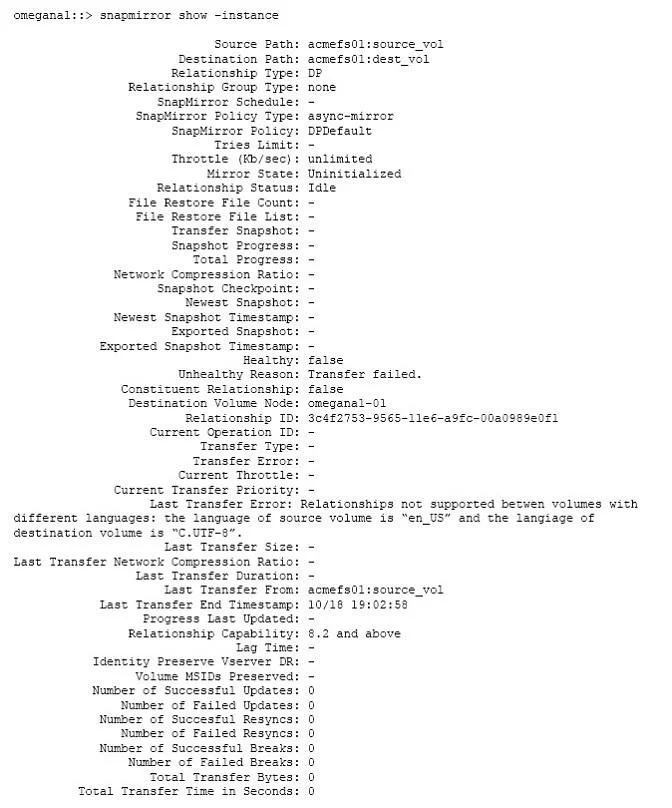
Click the Exhibit button. You create a new SnapMirror relationship, but is fails to initialize. The SnapMirror relationship is configured as shown in the exhibit. How would you solve this problem?
The correct answer is B. Re-create the destination volume as en_US. The source Volume has got en_US. The only way to solve the problem ist o delete and recreate the Destination volume with language to en_US, or to change the source volume language to C..UTF-8. Both languages must be the same. You can create volume with different languages in
Question
Click the Exhibit button. You create a new SnapMirror relationship, but is fails to initialize. The SnapMirror relationship is configured as shown in the exhibit. How would you solve this problem?
Exhibit
Options
- ARe-create the destination volume as C.UTF-8.
- BRe-create the destination volume as en_US.
- CChange the language on the source volume to en_US.
- DChange the language on the destination volume to C.UTF-8.
How the community answered
(47 responses)- A6% (3)
- B72% (34)
- C4% (2)
- D17% (8)
Explanation
The source Volume has got en_US. The only way to solve the problem ist o delete and recreate the Destination volume with language to en_US, or to change the source volume language to C..UTF-8. Both languages must be the same. You can create volume with different languages in
Topics
Community Discussion
No community discussion yet for this question.