
NCP-MCI-6.10 · Question #87
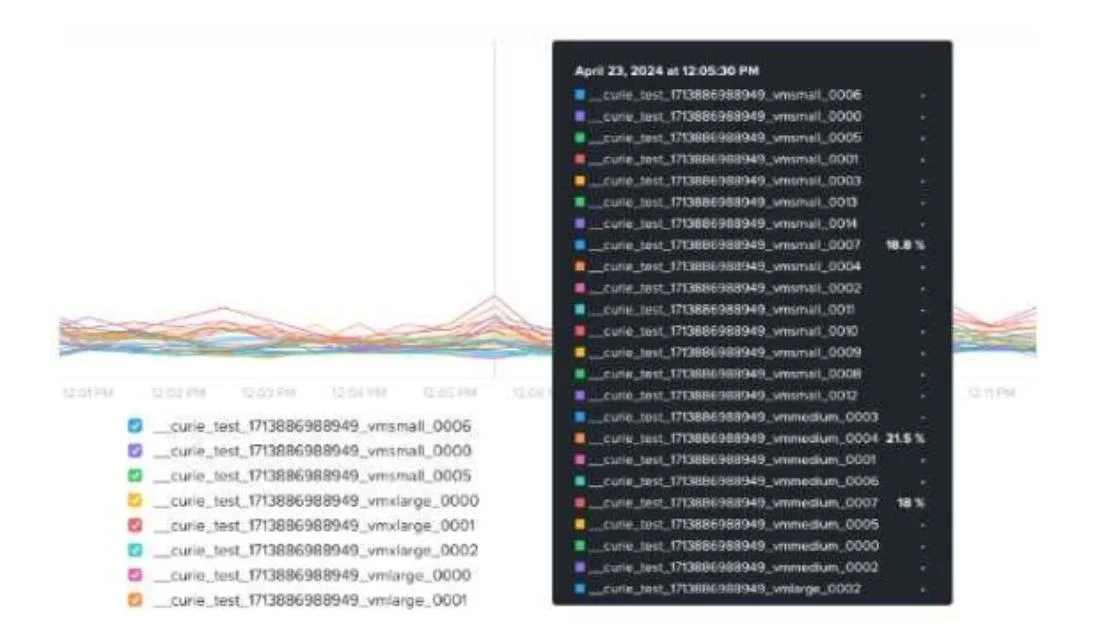
An administrator receives complaints about VM performance. After reviewing the VM's CPU Ready Time data shown in the exhibit, which step should the administrator take to diagnose the issue further?
The correct answer is B. Review host CPU utilization. Understanding the Issue The administrator is investigating VM performance complaints and is analyzing CPU Ready Time CPU Ready Time is a crucial metric in Nutanix and virtualization environments (AHV, ESXi, or It measures the amount of time a VM is waiting for CPU scheduling…
Question
An administrator receives complaints about VM performance. After reviewing the VM's CPU Ready Time data shown in the exhibit, which step should the administrator take to diagnose the issue further?
Exhibit
Options
- ACheck the number of vCPUs assigned to each CVM.
- BReview host CPU utilization.
- CAssess cluster SSD capacity.
- DEnable VM memory oversubscription.
How the community answered
(17 responses)- A6% (1)
- B88% (15)
- C6% (1)
Explanation
Understanding the Issue The administrator is investigating VM performance complaints and is analyzing CPU Ready Time CPU Ready Time is a crucial metric in Nutanix and virtualization environments (AHV, ESXi, or It measures the amount of time a VM is waiting for CPU scheduling due to resource contention. High CPU Ready Time indicates that VMs are ready to run but are waiting because the host lacks available CPU resources. Analysis of the Exhibit The graph shows CPU Ready Time spikes for multiple VMs. Some VMs have CPU Ready Time exceeding 18% to 21.5%, which is very high. A healthy CPU Ready Time should be below 5%. Values above 10% indicate CPU contention, and anything above 20% is critical and requires immediate troubleshooting.
Topics
Community Discussion
No community discussion yet for this question.