
NCP-MCA · Question #150
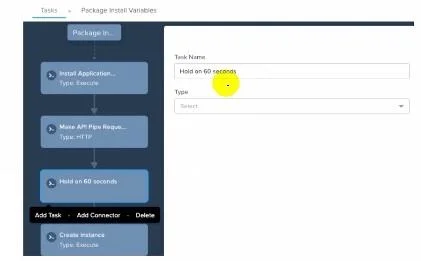
Exhibit. Which task should be used in order to wait 60 seconds before continuing with the next task?
The correct answer is D. Wait task specifying 60 seconds. To wait for 60 seconds before continuing with the next task in a Nutanix Calm blueprint, you should use the "Wait" task and specify 60 seconds. This task is designed specifically to introduce a delay in the execution flow without the need for additional scripting.
Question
Exhibit. Which task should be used in order to wait 60 seconds before continuing with the next task?
Exhibit
Options
- AExecute executing a bash script with a sleep 60 command.
- BHTTP task to download and execute a shell script from gift.
- CDelay basic specifying 60 seconds.
- DWait task specifying 60 seconds.
How the community answered
(38 responses)- B3% (1)
- C3% (1)
- D95% (36)
Explanation
To wait for 60 seconds before continuing with the next task in a Nutanix Calm blueprint, you should use the "Wait" task and specify 60 seconds. This task is designed specifically to introduce a delay in the execution flow without the need for additional scripting.
Topics
Community Discussion
No community discussion yet for this question.