
NCP-DB-6.10 · Question #179
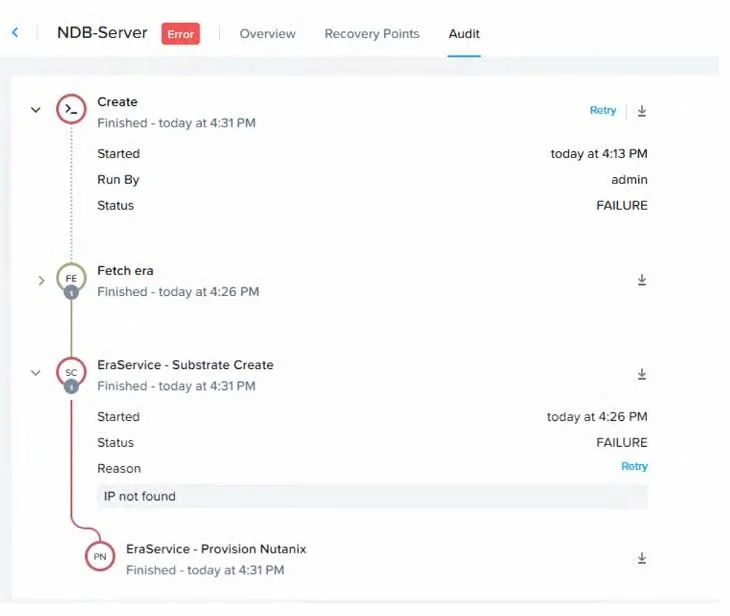
Refer to the exhibit. An administrator tried to provision Nutanix Database Service (NDB) from Prism Central Marketplace and is getting the error shown in the exhibit. Which action would have…
The correct answer is A. Configure an IP address when deploying the application. The exhibit shows an error during the provisioning of NDB from the Prism Central Marketplace, with a failure reason stating "IP not found" in the "EraService - Substrate Create" step. This indicates that the provisioning process could not assign or detect an IP address for the…
Question
Refer to the exhibit. An administrator tried to provision Nutanix Database Service (NDB) from Prism Central Marketplace and is getting the error shown in the exhibit. Which action would have prevented this issue?
Exhibit
Options
- AConfigure an IP address when deploying the application.
- BImport the proper image in the Prism Central.
- CProvide a subnet with IP Address Management
- DRegister NDB using the correct IP address.
How the community answered
(49 responses)- A73% (36)
- B4% (2)
- C16% (8)
- D6% (3)
Explanation
The exhibit shows an error during the provisioning of NDB from the Prism Central Marketplace, with a failure reason stating "IP not found" in the "EraService - Substrate Create" step. This indicates that the provisioning process could not assign or detect an IP address for the NDB instance, likely due to an unconfigured or missing IP address during deployment. To prevent this issue, the administrator should configure an IP address when deploying the application. This involves specifying a static IP or ensuring IP Address Management (IPAM) is properly set up to allocate an IP during the Prism Central Marketplace deployment wizard.
Topics
Community Discussion
No community discussion yet for this question.