
NCP-DB-6.10 · Question #138
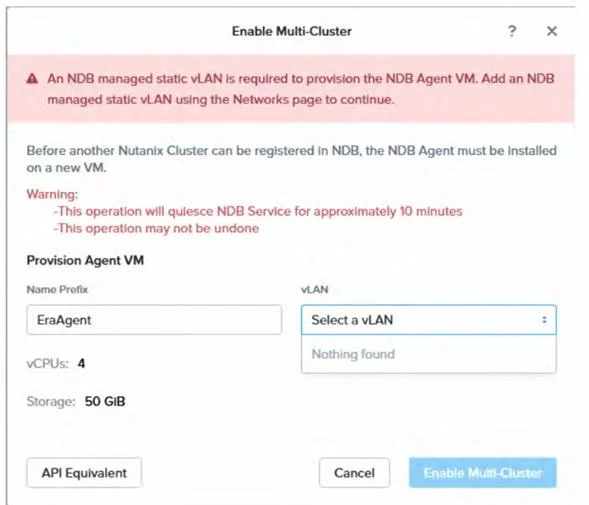
Refer to the exhibit. An administrator has opened the Enable Multi-Cluster configuration for an NDB instance, but the wizard does not present the VLAN, as shown in the exhibit. Which configuration…
The correct answer is A. A network profile must be created first. The provided exhibit shows the "Enable Multi-Cluster" configuration wizard in NDB, where the VLAN dropdown is empty with a "Nothing found" message, indicating that no VLANs are available for selection. This issue arises because NDB requires a network profile to be created…
Question
Refer to the exhibit. An administrator has opened the Enable Multi-Cluster configuration for an NDB instance, but the wizard does not present the VLAN, as shown in the exhibit. Which configuration allows to choose a VLAN in the drop-down box?
Exhibit
Options
- AA network profile must be created first.
- BVerify if subnet leverages advanced network control.
- CIP address pool must be managed in NDB.
- DVLAN subnet must use IP address management.
How the community answered
(35 responses)- A83% (29)
- B9% (3)
- C3% (1)
- D6% (2)
Explanation
The provided exhibit shows the "Enable Multi-Cluster" configuration wizard in NDB, where the VLAN dropdown is empty with a "Nothing found" message, indicating that no VLANs are available for selection. This issue arises because NDB requires a network profile to be created before provisioning the NDB Agent VM and enabling multi-cluster support. A network profile defines the static VLANs managed by NDB, which are essential for network configuration during multi-cluster setup. The warning in the exhibit ("An NDB managed static vLAN is required to provision the NDB Agent VM. Add an NDB managed static vLAN using the Networks page to continue.") reinforces that the administrator must create a network profile via the Networks page to populate the VLAN
Topics
Community Discussion
No community discussion yet for this question.