
NCP-DB-6.10 · Question #119
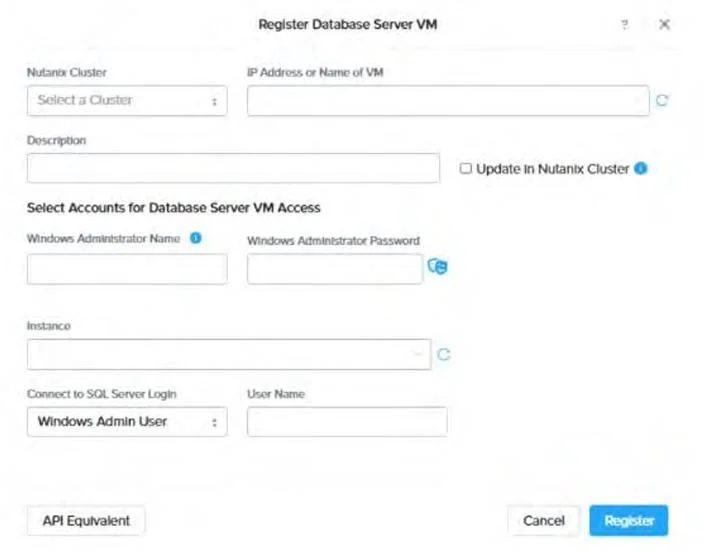
Refer to the exhibit. An administrator wants to register a database using a SQL Server User. Where can this user be specified?
The correct answer is B. In the Login field after selecting SQL Server User. The image provided shows the "Register Database Server VM" interface in NDB, which includes fields for registering a database server, including options for Windows and SQL Server credentials. When an administrator wants to register a database using a SQL Server User (instead of…
Question
Refer to the exhibit. An administrator wants to register a database using a SQL Server User. Where can this user be specified?
Exhibit
Options
- AIn the Windows Administrator Name field
- BIn the Login field after selecting SQL Server User
- COnly via the command line registration option
- DBy modifying the code in the API Equivalent section
How the community answered
(56 responses)- A4% (2)
- B88% (49)
- C7% (4)
- D2% (1)
Explanation
The image provided shows the "Register Database Server VM" interface in NDB, which includes fields for registering a database server, including options for Windows and SQL Server credentials. When an administrator wants to register a database using a SQL Server User (instead of Windows credentials), the appropriate place to specify this user is in the "Connect to SQL Server Login" section. The interface includes a "User Name" field under this section, which becomes relevant after selecting the option to use a SQL Server User (typically indicated by a radio button or dropdown, though not fully visible in the image). This allows NDB to authenticate and manage the SQL Server instance using database-specific credentials rather than relying solely on Windows Administrator credentials.
Topics
Community Discussion
No community discussion yet for this question.