
Nutanix
NCP-CN-6.10 · Question #24
After selecting the Production workspace and selecting View Details for the cluster prod-01, a Platform Engineer wanted to enable the NKP Insights application. This application is under the…
The correct answer is D. Select Clusters in the left menu, select View Details for the cluster prod-01, then in the Application. You've hit your limit · resets 5am (America/New_York)
Security and Observability
Question
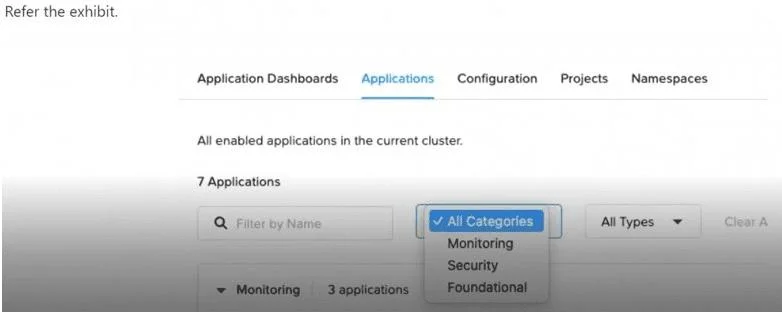
After selecting the Production workspace and selecting View Details for the cluster prod-01, a Platform Engineer wanted to enable the NKP Insights application. This application is under the Observability category, but this category doesn't appear in the list. Which action should the engineer take to be able to deploy the NKP Insights application in the Kubernetes cluster for this workspace?
Exhibit
Options
- ASelect Clusters in the left menu, select Applications, and select Enable in the NKP Insights three-
- BSelect Applications in the left menu, press the three-dot menu in the NKP Insights application
- CSelect Insights in the left menu and select the Enable button.
- DSelect Clusters in the left menu, select View Details for the cluster prod-01, then in the Application
How the community answered
(36 responses)- A17% (6)
- B6% (2)
- C6% (2)
- D72% (26)
Explanation
You've hit your limit · resets 5am (America/New_York)
Topics
#NKP Insights#observability#application deployment#UI navigation
Community Discussion
No community discussion yet for this question.