
N10-009 · Question #118
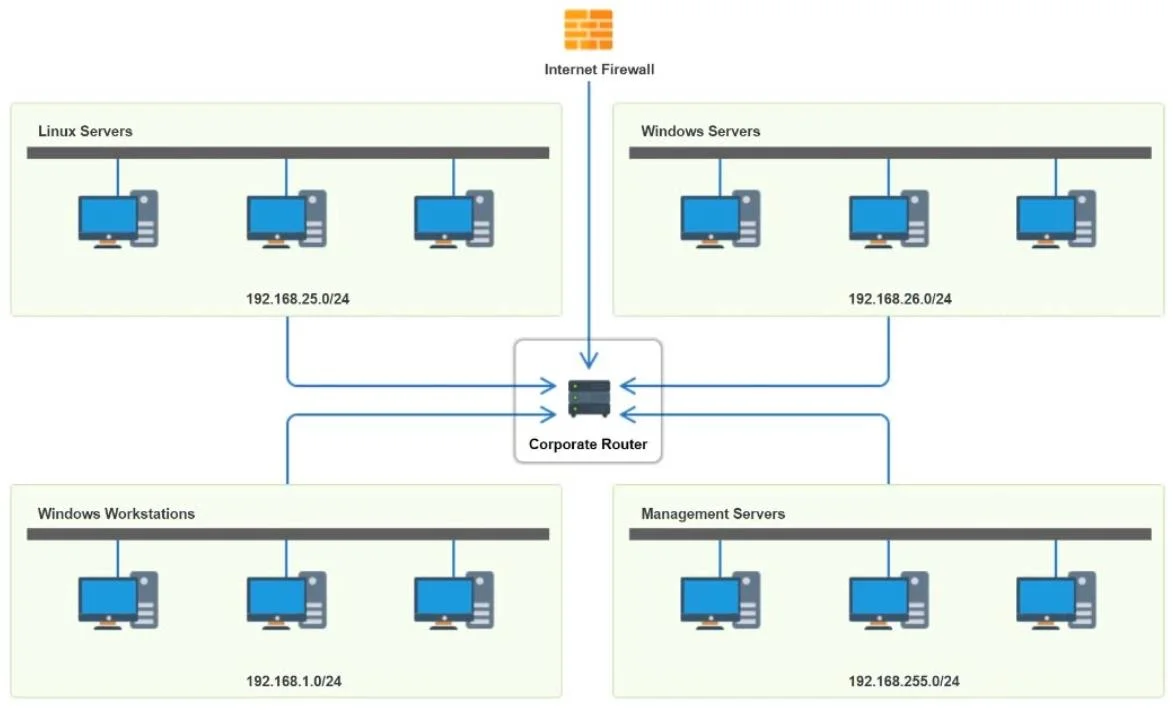
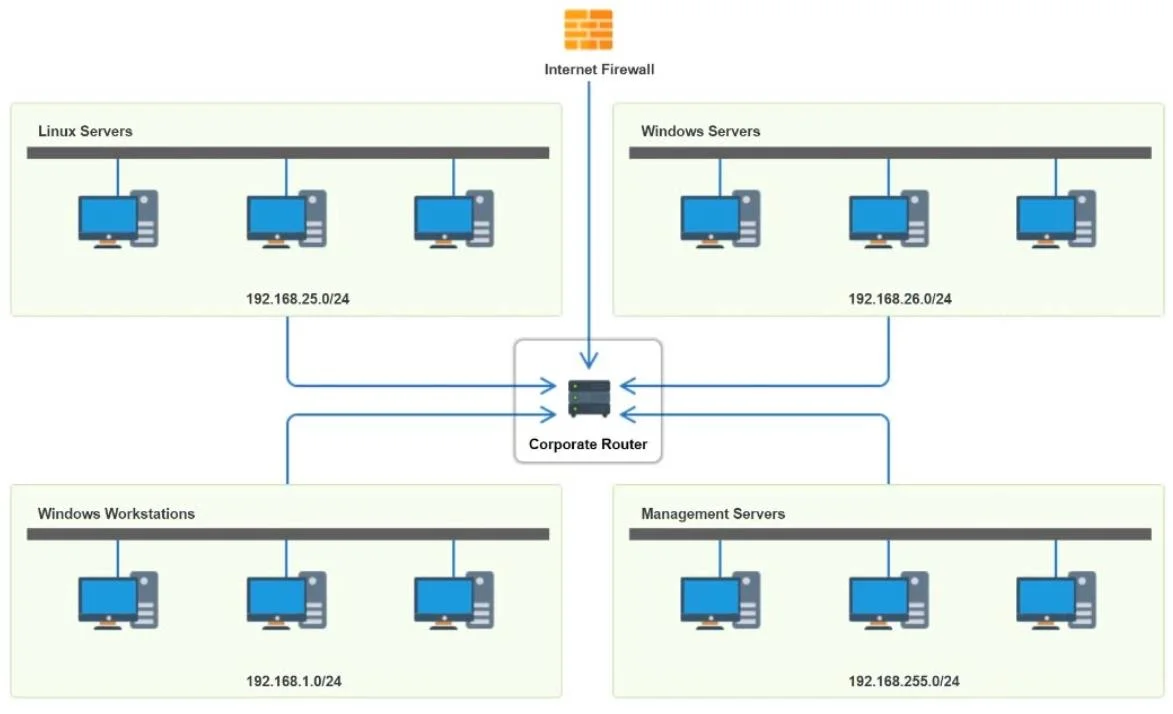
SIMULATION You have been tasked with implementing an ACL on the router that will: 1. Permit the most commonly used secure remote access technologies from the management network to all other local…
ACL Simulation - Explanation Overall Goal and Approach This ACL enforces network segmentation with least-privilege access. The key principle: ACLs are processed top-down, first-match wins. More specific rules must come before broader ones. The three objectives translate to: 1…
Question
Exhibits
Explanation
ACL Simulation - Explanation
Overall Goal and Approach
This ACL enforces network segmentation with least-privilege access. The key principle: ACLs are processed top-down, first-match wins. More specific rules must come before broader ones. The three objectives translate to:
- Management network gets SSH/RDP/etc. to server segments
- User subnet is blocked from using those same protocols to reach servers
- Implicit deny-all at the end catches everything else
Assumed Network Layout
| Subnet | Role |
|---|---|
192.168.1.0/24 | User subnet (workstations) |
192.168.25.0/24 | Linux server segment |
192.168.26.0/24 | Windows server segment |
192.168.255.0/24 | Management network |
Step-by-Step Breakdown
Rule 1 - Allow management -> servers (remote access)
Source: management network | Dest: server segments | Protocol: TCP | Services: SSH, RDP, VNC, etc. | Action: Allow
This is the primary permissive rule implementing objective #1. SSH covers Linux servers; RDP/SMB cover Windows servers. Must come early - before any deny rules for these protocols.
If skipped: Administrators lose all remote access to servers.
Rules 2 & 3 - Allow intra-segment communication
Source/Dest: same subnet (e.g., 192.168.25.0 -> 192.168.25.0) | Action: Allow
Servers within the same segment need to communicate with each other (clustering, replication). Without this, a later deny-all would block intra-segment traffic.
If skipped: Servers within the same VLAN can't talk to each other.
Rule 4 - Allow management -> Windows servers via SMB only
Source: 192.168.255.0 | Dest: 192.168.26.0 | Service: SMB | Action: Allow
SMB (port 445) is required for Windows file shares and administrative access. This grants the management network specific Windows admin capability.
If skipped: Management network can't access Windows file shares.
Rule 5 - Deny all other management traffic
Source: 192.168.255.0 | Dest: Any | Action: Deny
After explicitly allowing what management needs, everything else from that subnet is blocked. This limits blast radius if management credentials are compromised.
If placed before Rule 4: SMB from management would also be blocked. Order is critical here.
Rules 6 & 7 - Deny user subnet -> server segments (remote access protocols)
Source: 192.168.1.0 | Dest: 192.168.25.0 and 192.168.26.0 | Services: SSH, RDP, etc. | Action: Deny
This directly implements objective #2. Users should not be able to SSH into Linux servers or RDP into Windows servers. These must come before Rule 8 (which broadly allows user traffic), otherwise users would reach servers via those protocols before being denied.
If placed after Rule 8: Rule 8's broad Allow would match first and these denies would never be evaluated.
Rule 8 - Allow user subnet general traffic
Source: 192.168.1.0 | Dest: Any | Protocol: Any | Action: Allow
Users still need internet access, DNS, web browsing, etc. This catch-all allows everything not already explicitly denied for the user subnet. It works only because Rules 6 & 7 already blocked the sensitive protocols.
If skipped: Users lose all network connectivity.
Rule 9 - Deny Linux server segment outbound
Source: 192.168.25.0 | Dest: Any | Action: Deny
Servers should not be initiating outbound connections arbitrarily. This limits lateral movement and data exfiltration if a Linux server is compromised. Intra-segment traffic was already allowed in Rule 2.
If skipped: A compromised Linux server could initiate connections to any destination.
What Happens Without a Final Implicit Deny
Most firewalls/routers have an implicit deny-all at the end of every ACL. This procedure makes it explicit (Rules 5, 9) for specific high-risk subnets rather than relying solely on the implicit rule. Objective #3 is satisfied by the combination of explicit denies and the router's implicit deny.
Memory Tip
Use the mnemonic "APSE-DDA-D" - Allow privileged access first, Protect intra-segment communication, Specific exceptions next, Explicit denies for privileged subnets, then Deny the user subnet from sensitive protocols, Drop with broad allow for users, Apply server outbound deny.
Or more simply: specific allows -> specific denies -> broad allows -> broad denies. Never put a broad allow before a specific deny targeting the same source.
Topics
Community Discussion
No community discussion yet for this question.