
Microsoft
MS-900 · Question #464
Drag and Drop Question A company plans to implement Microsoft Viva. You need to identify the Viva apps. Match each app to its feature. To answer, move the appropriate Viva app from the column on the…
Sign in or unlock MS-900 to reveal the answer and full explanation for question #464. The question stem and answer options stay visible for context.
Submitted by viktor_hu· Mar 5, 2026Describe Microsoft Viva apps and their capabilities within the Microsoft 365 ecosystem
Question
Drag and Drop Question A company plans to implement Microsoft Viva. You need to identify the Viva apps. Match each app to its feature. To answer, move the appropriate Viva app from the column on the left to its description on the right. You may use each app once, more than once, or not at all. NOTE: Each correct match is worth one point. Answer:
Exhibit
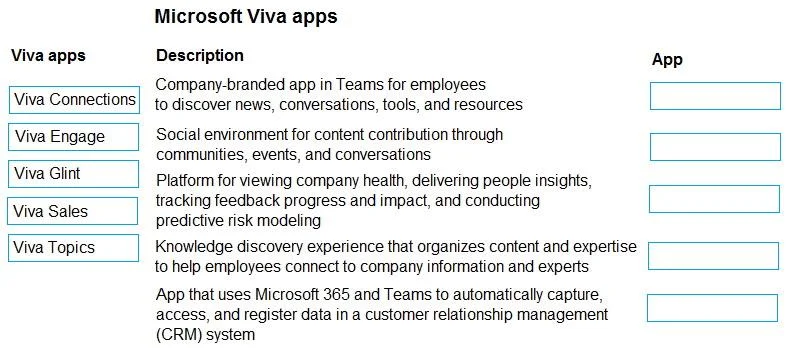
Answer Area
Drag items
Viva ConnectionsViva EngageViva GlintViva SalesViva Topics
Unlock MS-900 to see the answer
You've previewed enough free MS-900 questions. Unlock MS-900 for full answers, explanations, the timed quiz mode, progress tracking, and the master PDF. Question stem and options stay visible so you can still see what's on the exam.
Topics
#Microsoft Viva#Employee Experience#Microsoft 365#Viva Apps