
MS-900 · Question #421
Hotspot Question Instructions: For each of the following statements, select Yes if the statement is true. Otherwise, select No. NOTE: Each correct selection is worth one point. Answer:
The correct answer is Conditional access policies allow you to require multi-factor authentication for Microsoft Azure management tasks. = Yes; Conditional access policies allow you to require multi-factor authentication for users who have administrative roles. = Yes; Configuration of app specific settings require devices to be managed by an organization. = No. This question tests the candidate's understanding of Azure AD Conditional Access capabilities, specifically regarding Multi-Factor Authentication enforcement for management tasks and administrative roles, and the distinction between app protection policies (MAM) and full device…
Question
Exhibit
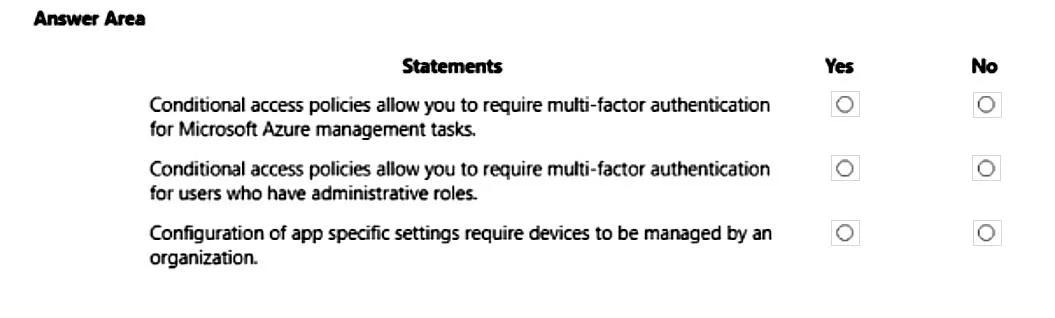
Answer Area
- Conditional access policies allow you to require multi-factor authentication for Microsoft Azure management tasks.Yes
- Conditional access policies allow you to require multi-factor authentication for users who have administrative roles.Yes
- Configuration of app specific settings require devices to be managed by an organization.No
Explanation
This question tests the candidate's understanding of Azure AD Conditional Access capabilities, specifically regarding Multi-Factor Authentication enforcement for management tasks and administrative roles, and the distinction between app protection policies (MAM) and full device management (MDM).
Approach. The correct interaction is to select the radio buttons as follows:
-
Statement 1: Conditional access policies allow you to require multi-factor authentication for Microsoft Azure management tasks.
- Correct selection: Yes. Azure AD Conditional Access policies can be configured to target specific cloud applications, including 'Microsoft Azure Management'. By targeting this application, administrators can enforce requirements such as Multi-Factor Authentication (MFA) for anyone attempting to access the Azure portal, Azure PowerShell, Azure CLI, or other management interfaces. This is a critical security measure to protect administrative access.
-
Statement 2: Conditional access policies allow you to require multi-factor authentication for users who have administrative roles.
- Correct selection: Yes. Conditional Access policies offer granular control to target users based on their directory roles (e.g., Global Administrator, User Administrator, etc.). This capability is widely used to mandate MFA for all privileged accounts, significantly reducing the risk of unauthorized access to sensitive administrative functions, even if credentials are compromised.
-
Statement 3: Configuration of app specific settings require devices to be managed by an organization.
- Correct selection: No. This statement refers to app protection policies, commonly known as Mobile Application Management (MAM), which are part of Microsoft Intune. App protection policies allow organizations to configure security settings within applications (e.g., requiring a PIN for the app, restricting copy/paste, enforcing encryption of organizational data). Crucially, these policies can be applied to both organization-owned devices (which may or may not be fully managed via MDM) and personal (unmanaged) devices. Full device management (Mobile Device Management - MDM enrollment) is not a prerequisite for applying app-specific protection policies.
Common mistakes.
- common_mistake. 1. Selecting 'No' for the first two statements: This indicates a fundamental misunderstanding of Azure AD Conditional Access capabilities. Enforcing MFA for accessing management interfaces and for users in administrative roles are two of the most common and powerful use cases for Conditional Access, central to securing an Azure environment. Choosing 'No' suggests unawareness of these core security features.
- Selecting 'Yes' for the third statement: This is a common confusion between Mobile Application Management (MAM) and Mobile Device Management (MDM). While device compliance policies (which are part of MDM) do require devices to be managed, 'app specific settings' typically refers to MAM. MAM is specifically designed to protect data at the application level and can operate on devices that are not fully enrolled in MDM. A candidate might mistakenly assume that any corporate security setting requires the device to be fully managed.
Concept tested. Azure Active Directory Conditional Access, Multi-Factor Authentication (MFA), securing administrative roles, Azure Management protection, Mobile Application Management (MAM), Mobile Device Management (MDM), and the distinction between app protection policies and device enrollment requirements.
Topics
Community Discussion
No community discussion yet for this question.