
MS-900 · Question #319
Hotspot Question A company uses Microsoft 365 services that include Microsoft eDiscovery. Instructions: For each of the following statements, select Yes if the statement is true. Otherwise, select…
The correct answer is Microsoft eDiscovery can be used to identify email content needed as evidence in a legal case = Yes; Microsoft eDiscovery can be used to search for specific documents that are stored in SharePoint Online = Yes; Microsoft eDiscovery can be used to ensure that documents in SharePoint sites are retained for seven years and then deleted = No. This hotspot question tests knowledge of Microsoft eDiscovery capabilities within Microsoft 365, specifically around what actions and features are available at different eDiscovery tiers (Content Search, eDiscovery Standard, and eDiscovery Premium).
Question
Exhibit
Answer Area
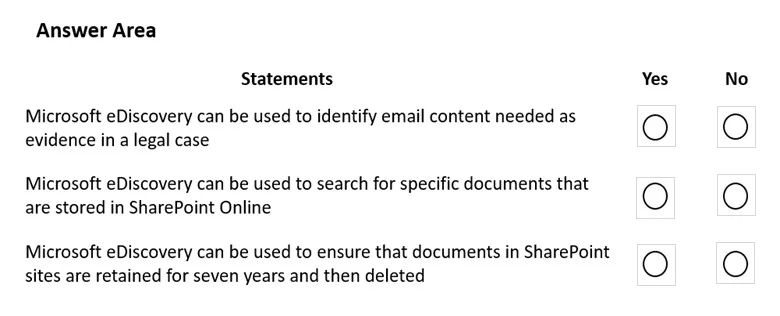
- Microsoft eDiscovery can be used to identify email content needed as evidence in a legal caseYes
- Microsoft eDiscovery can be used to search for specific documents that are stored in SharePoint OnlineYes
- Microsoft eDiscovery can be used to ensure that documents in SharePoint sites are retained for seven years and then deletedNo
Explanation
This hotspot question tests knowledge of Microsoft eDiscovery capabilities within Microsoft 365, specifically around what actions and features are available at different eDiscovery tiers (Content Search, eDiscovery Standard, and eDiscovery Premium).
Approach. To answer eDiscovery hotspot questions correctly, you must understand the three tiers: Content Search (basic search/export), eDiscovery Standard (adds holds and case management), and eDiscovery Premium (adds advanced analytics, custodian management, review sets, and legal hold notifications). Statements about placing holds on mailboxes require at least eDiscovery Standard. Statements about review sets, advanced indexing, or custodian workflows require eDiscovery Premium. Statements about simply searching and exporting content can be done with Content Search or higher. Always map the capability described to the minimum tier that supports it and verify whether the statement aligns with actual Microsoft 365 eDiscovery functionality.
Concept tested. Microsoft 365 eDiscovery tiers and capabilities - including Content Search, eDiscovery Standard (formerly Core eDiscovery), and eDiscovery Premium (formerly Advanced eDiscovery) - and understanding which features (holds, review sets, custodian management, legal hold notifications, advanced analytics) are available at each tier.
Reference. Microsoft Learn: Overview of Microsoft Purview eDiscovery solutions - https://learn.microsoft.com/en-us/purview/ediscovery
Topics
Community Discussion
No community discussion yet for this question.