
MS-900 · Question #25
Hotspot Question An organization plans to deploy Microsoft Intune. For each of the following statements, select Yes if the statement is true. Otherwise, select No. NOTE: Each correct selection is…
Microsoft Intune utilizes App Protection Policies for granular data control and offers selective wipe options to ensure personal data is preserved when removing corporate access.
Question
Exhibit
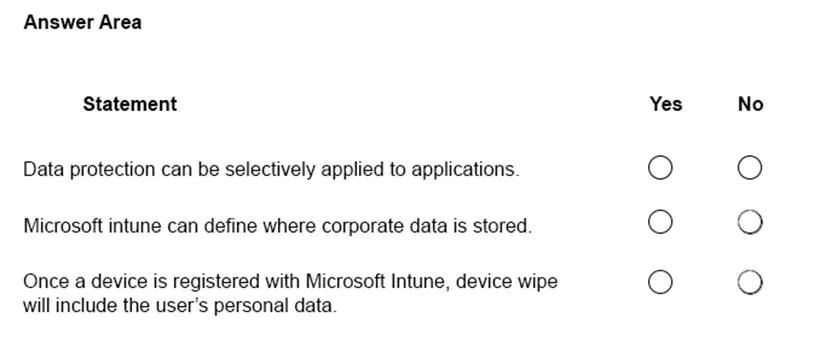
Answer Area
- Data protection can be selectively applied to applications.
- Microsoft intune can define where corporate data is stored.
- Once a device is registered with Microsoft Intune, device wipe will include the user's personal data.
Explanation
Microsoft Intune utilizes App Protection Policies for granular data control and offers selective wipe options to ensure personal data is preserved when removing corporate access.
Approach. 1. 'Data protection can be selectively applied to applications' -> Yes: Intune Mobile Application Management (MAM) and App Protection Policies allow admins to apply security policies (e.g., requiring a PIN, restricting copy/paste) to specific managed apps without affecting personal apps on the same device. 2. 'Microsoft intune can define where corporate data is stored' -> Yes: App Protection Policies can restrict 'Save As' capabilities, preventing users from saving corporate data to local, unmanaged storage and forcing them to use approved locations like OneDrive for Business. 3. 'Once a device is registered with Microsoft Intune, device wipe will include the user's personal data' -> No: Intune distinguishes between a full 'Wipe' (factory reset) and a 'Retire' (selective wipe). For BYOD scenarios, a selective wipe is used to remove only corporate data, policies, and managed apps, leaving the user's personal photos, apps, and data untouched.
Common mistakes.
- common_mistake. A common mistake is selecting 'Yes' for the third statement by confusing a full device 'Wipe' (which does perform a factory reset) with the overall concept of removing a device from Intune management. Intune specifically provides the 'Retire' action to prevent the deletion of personal data on registered/BYOD devices.
Concept tested. Microsoft Intune App Protection Policies (MAM), Corporate Data Management, and Device Actions (Wipe vs. Retire).
Reference. https://learn.microsoft.com/en-us/mem/intune/remote-actions/devices-wipe
Topics
Community Discussion
No community discussion yet for this question.