
MS-900 · Question #247
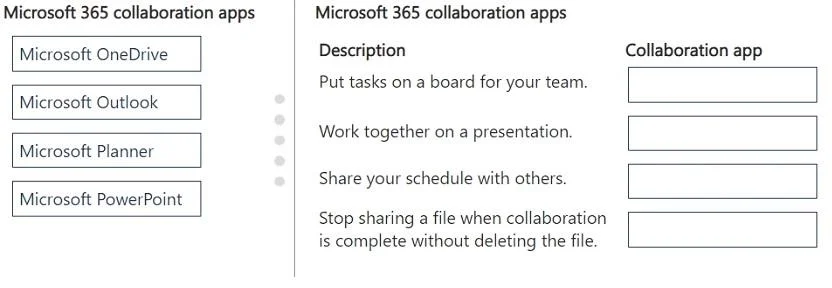
Drag and Drop Question A company is evaluating Microsoft 365 collaboration apps. You need to describe the collaboration apps. Match each collaboration app to its description. To answer, move the…
Microsoft Outlook is designed for email and calendar management, making it the ideal tool for sharing your schedule with others. Microsoft PowerPoint is specifically built for creating and co-authoring presentations, enabling real-time collaboration on slides. Microsoft Planner…
Question
Exhibit
Explanation
Microsoft Outlook is designed for email and calendar management, making it the ideal tool for sharing your schedule with others. Microsoft PowerPoint is specifically built for creating and co-authoring presentations, enabling real-time collaboration on slides. Microsoft Planner provides a Kanban-style board interface for organizing and assigning tasks to team members, and Microsoft OneDrive allows users to manage file sharing permissions, including stopping sharing access without deleting the underlying file.
Topics
Community Discussion
No community discussion yet for this question.