
MS-900 · Question #135
Drag and Drop Question You administer a Microsoft 365 tenant. You need to be able to quickly identify the status of each by its icon. Which service status is associated with each icon? To answer…
The correct answer is Service is healthy; Advisory; Incident. In the Microsoft 365 Admin Center Service Health dashboard, icons follow a specific color-coded system: a green checkmark indicates 'Service is healthy' (no issues detected), a yellow/orange warning triangle or information icon indicates an 'Advisory' (a minor issue or…
Question
Exhibit
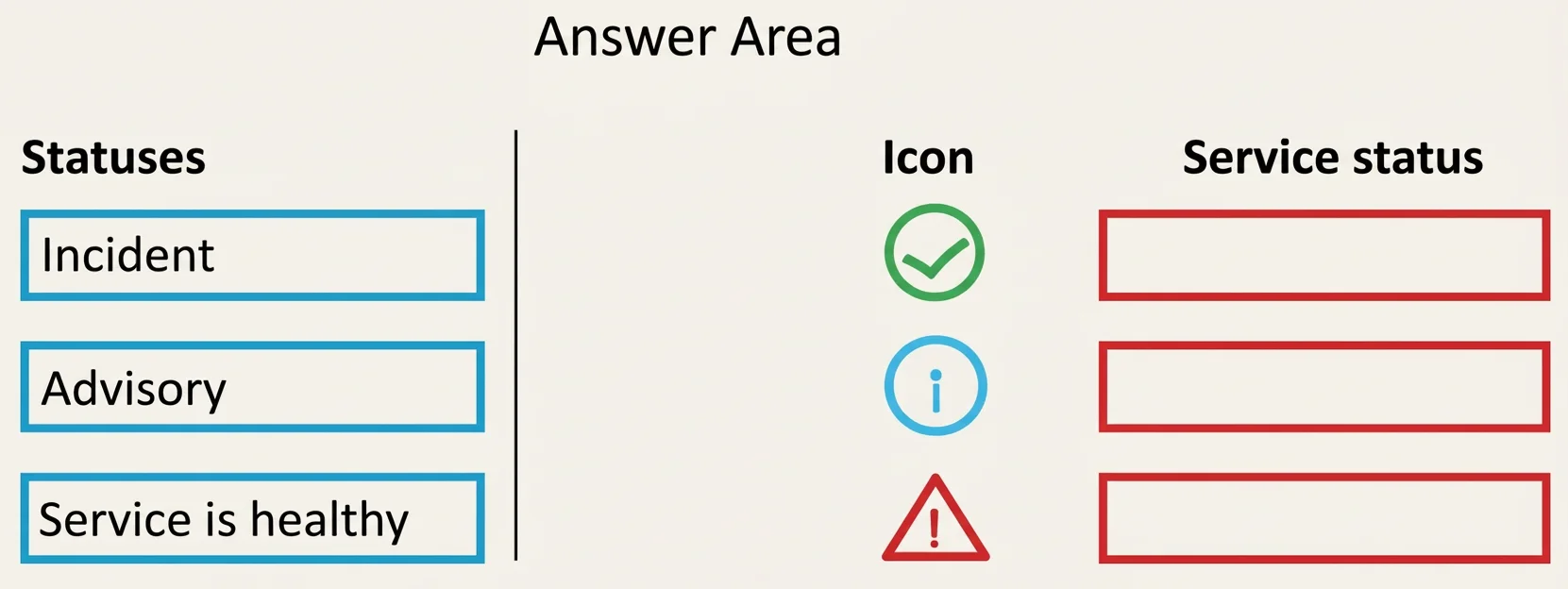
Answer Area
Drag items
Correct arrangement
- Service is healthy
- Advisory
- Incident
Explanation
In the Microsoft 365 Admin Center Service Health dashboard, icons follow a specific color-coded system: a green checkmark indicates 'Service is healthy' (no issues detected), a yellow/orange warning triangle or information icon indicates an 'Advisory' (a minor issue or informational notice that may affect some users but has a workaround), and a red X or alert icon indicates an 'Incident' (a significant service disruption actively impacting users). These visual indicators allow administrators to quickly triage service health without reading detailed descriptions.
Topics
Community Discussion
No community discussion yet for this question.