
MS-900 · Question #130
Hotspot Question For each of the following statements, select Yes if the statement is true. Otherwise, select No. NOTE: Each correct selection is worth one point. Answer:
The correct answer is A sensitivity label can be used to prevent data loss from Windows devices by turning on the endpoint protection in Microsoft Intune. = No; You can use a sensitivity label to mark the content of documents by adding a custon watermark. = Yes; After a sensitivity level is applied, the content of documents is encrypted, but the content of email is not encrypted. = No. Assess the capabilities of Microsoft Purview sensitivity labels regarding device integration, content marking, and encryption scope.
Question
Exhibit
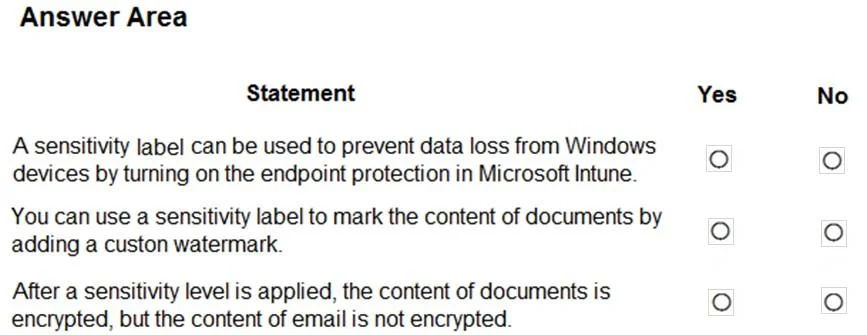
Answer Area
- A sensitivity label can be used to prevent data loss from Windows devices by turning on the endpoint protection in Microsoft Intune.No
- You can use a sensitivity label to mark the content of documents by adding a custon watermark.Yes
- After a sensitivity level is applied, the content of documents is encrypted, but the content of email is not encrypted.No
Explanation
Assess the capabilities of Microsoft Purview sensitivity labels regarding device integration, content marking, and encryption scope.
Approach. Evaluate each statement against Microsoft Purview Information Protection capabilities:
- Statement 1: Select No. Sensitivity labels classify and protect data but do not 'turn on' endpoint protection in Microsoft Intune. Intune Endpoint Protection manages security features like Defender Antivirus and Firewall. While Microsoft Purview Endpoint DLP prevents data loss on Windows devices and can use labels as rule conditions, the label itself does not activate Intune endpoint protection.
- Statement 2: Select Yes. A core feature of sensitivity labels is content marking. Administrators can configure labels to automatically apply custom watermarks, headers, and footers to documents.
- Statement 3: Select No. Sensitivity labels can apply encryption to both documents and emails. They integrate directly with Exchange Online and Outlook to protect messages in transit and at rest.
Common mistakes.
- common_mistake. Practice exams (like the one in the second image) sometimes incorrectly mark the first statement as 'Yes'. However, sensitivity labels and Intune Endpoint Protection are distinct. While Endpoint DLP uses labels, it is a Purview feature, not an Intune Endpoint Protection feature. Another mistake is assuming labels only encrypt files; they natively protect emails as well.
Concept tested. Microsoft Purview Information Protection (Sensitivity Labels, Content Marking, and Encryption)
Reference. https://learn.microsoft.com/en-us/purview/sensitivity-labels
Topics
Community Discussion
No community discussion yet for this question.