nerdexam
Microsoft

MS-720 · Question #128

Case Study 2 - Litware, Inc Overview General Overview The network contains an Active Directory forest named contoso.com that syncs to Microsoft 365 by using Azure AD Connect. Domain controllers run…

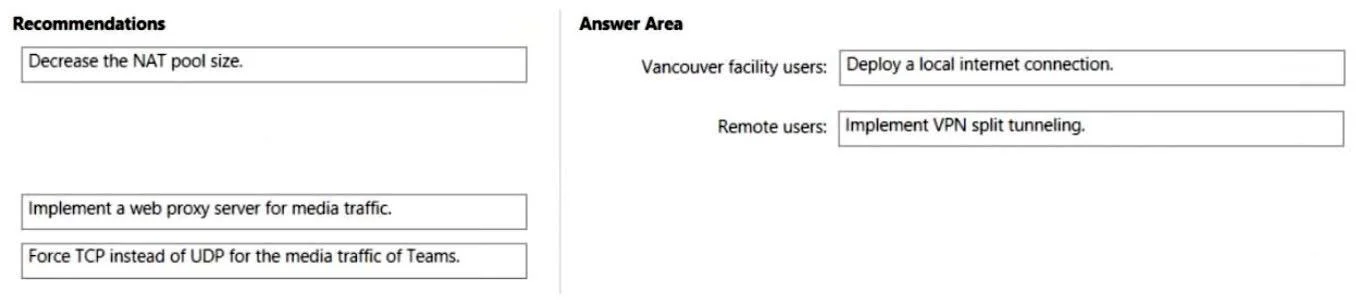
The correct answer is Deploy a local internet connection.; Implement VPN split tunneling. The question requires matching network optimization recommendations to specific user groups based on the provided case study details regarding network infrastructure and user locations.

Optimize network performance

Question

Case Study 2 - Litware, Inc Overview General Overview The network contains an Active Directory forest named contoso.com that syncs to Microsoft 365 by using Azure AD Connect. Domain controllers run Windows Server 2019. Physical Locations Contoso has offices in Toronto, New York, and London. Contoso has a manufacturing facility in Vancouver. Contoso has a global sales team that works remotely without a physical corporate office. Existing Environment Active Directory Environment The network contains an Active Directory forest named contoso.com that syncs to Microsoft 365 by using Azure AD Connect. Domain controllers run Windows Server 2019. Microsoft Office 365 Contoso has a Microsoft 365 subscription. All users are assigned Microsoft 365 E3 licenses. Contoso uses Microsoft Exchange Online for email. Network Infrastructure All the offices connect to each other by using a private WAN. The Toronto office has a 1-Gbps internet circuit and the London office has a 100-Mbps internet circuit. Internet access for all the offices is provided through the Toronto and London offices. The remote sales team users connect to the networks by using VPN connections. The remote users use various connection types, including wireless and mobile. Skype for Business Server traffic for the remote users is routed through the VPN connections. Telephony Contoso uses a centralized Skype for Business Server 2015 deployment configured for disaster recovery between the Toronto and London datacenters. Each frontend pool connects to the PSTN through a pair of managed Session Border Controllers (SBCs) that provide Enterprise Voice and dial-in conferencing. Contoso has a Skype for Business Server Survivable Branch Appliance (SBA) and a local SBC that connects to a Primary Rate Interface (PRI) in the Vancouver manufacturing facility. Contoso has hybrid connectivity deployed between Skype for Business Server and Office 365. All SBCs are Microsoft Teams-certified. The returns department has an auto attendant that uses an ID or [email protected]. Requirements Planned Changes Contoso plans to migrate all existing services from Skype for Business Server to Teams. Direct Routing will be deployed for the existing SBCs. Existing meeting rooms have Skype for Business Server video endpoints that are Skype for Business Server-certified. The endpoints are not Teams-certified. You plan to use the video endpoints in Teams until the equipment is replaced with Microsoft Teams Rooms. A limited pilot of the Teams migration and the Direct Routing deployment will occur in the Vancouver facility before deployment to the entire company. Technical Requirements Contoso identifies the following technical requirements: During the limited pilot, the media path must be optimized. Media flow for the remote sales team users must be optimized. All sales team users require inbound toll-free audio conferencing. Users in the Vancouver facility must be able to place emergency calls regardless of internet availability. When users in the returns department dial out, the outbound calls must display Contoso and the department's phone number. The video endpoints for the existing meeting rooms must be able to be used for both voice and video conferencing in Teams meetings. Drag and Drop Question You need to recommend network design changes that must be implemented before the Skype for Business Server to Microsoft Teams migration. What should you recommend for the Vancouver facility users and the remote sale team users? To answer, drag the appropriate recommendation to the correct users. Each recommendation may be used once, more than once, or not at all. You may need to drag the split bar between panes or scroll to view content. NOTE: Each correct selection is worth one point. Answer:

Exhibit

MS-720 question #128 exhibit

Answer Area

Drag items

Decrease the NAT pool size.Implement VPN split tunneling.Deploy a local internet connection.Implement a web proxy server for media traffic.Force TCP instead of UDP for the media traffic of Teams.

Correct arrangement

  • Deploy a local internet connection.
  • Implement VPN split tunneling.

Explanation

The question requires matching network optimization recommendations to specific user groups based on the provided case study details regarding network infrastructure and user locations.

Approach. For 'Vancouver facility users:', the correct recommendation is 'Deploy a local internet connection.'. The case study states that the Vancouver facility, like all other offices, routes its internet access through the Toronto and London offices. This 'tromboning' or backhauling of internet traffic significantly increases latency and consumes WAN bandwidth, especially for cloud-based services like Microsoft 365 or Teams. Deploying a local internet connection at the Vancouver facility allows users there to directly egress to the internet, reducing latency and improving performance for cloud services.

For 'Remote users:', the correct recommendation is 'Implement VPN split tunneling.'. The case study mentions that remote users connect via VPN and that 'Skype for Business Server traffic for the remote users is routed through the VPN connections.' This implies a full-tunnel VPN setup where all traffic, including internet-bound traffic to cloud services, is forced back through the corporate network. This adds unnecessary latency, consumes corporate internet bandwidth, and degrades performance for cloud services. Implementing VPN split tunneling allows remote users' internet-bound traffic (especially to trusted cloud services like Microsoft 365/Teams) to bypass the corporate VPN and go directly to the internet, while internal corporate resources are still accessed via the VPN. This greatly improves performance for real-time media and other cloud applications.

Common mistakes.

  • common_mistake. Common mistakes include misidentifying the primary networking bottleneck for each user group. For Vancouver facility users, implementing a web proxy or decreasing NAT pool size doesn't address the fundamental issue of backhauling all internet traffic through distant offices. For remote users, forcing TCP instead of UDP for media traffic is detrimental, as UDP is generally preferred for real-time media due to lower overhead and better handling of packet loss, while TCP's retransmission mechanisms can introduce latency and jitter. Also, a web proxy for media might add latency and is generally less effective than direct internet egress for real-time cloud media. Incorrectly applying 'Decrease the NAT pool size' or 'Implement a web proxy server for media traffic' to either group fails to address the core routing and performance issues described.

Concept tested. Network egress optimization, VPN tunneling types (full vs. split tunneling), and optimizing network connectivity for cloud services, particularly Microsoft 365 and real-time media applications like Microsoft Teams/Skype for Business Online.

Topics

#Network Optimization#Direct Routing#Remote Connectivity#Emergency Calling

Community Discussion

No community discussion yet for this question.

Full MS-720 Practice