
MS-302 · Question #20
You have a Microsoft 365 subscription. You need to prevent users from using third-party cloud storage in Microsoft Teams. Which settings should you configure from the Microsoft Teams&Skype for…
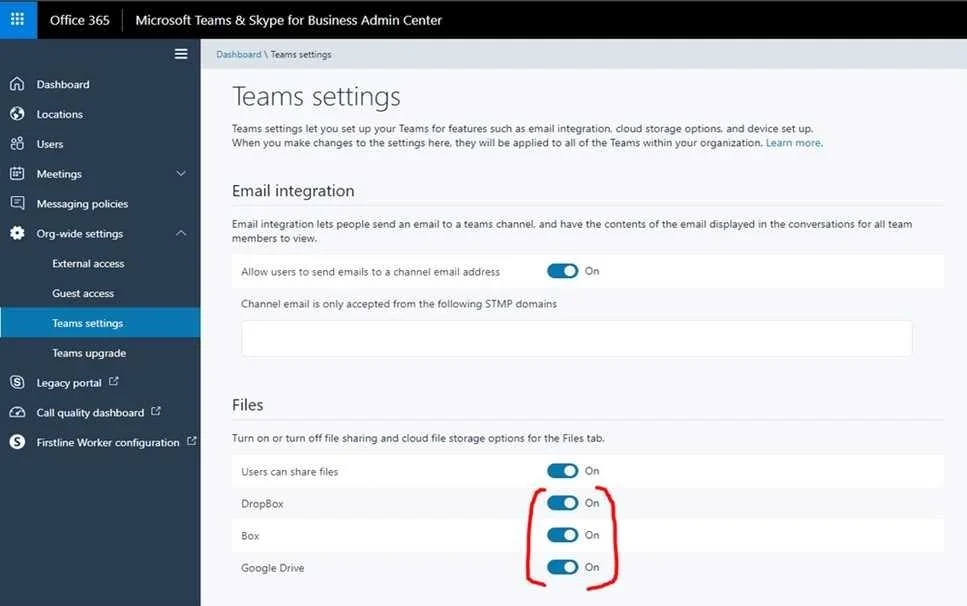
The correct answer is B. Teams settings. Go to "Microsoft Teams & Skype for Business Admin Center" and choose Org-wide settings - Team settings. Under "Files" it says "Turn on or turn off file sharing and cloud file storage options for the Files tab. Change the settings for DropBox, Box and Google Drive to "Off". then…
Question
You have a Microsoft 365 subscription. You need to prevent users from using third-party cloud storage in Microsoft Teams. Which settings should you configure from the Microsoft Teams&Skype for Business Admin Center?
Exhibit
Options
- AServices & add-ins
- BTeams settings
- CManage teams
- DMessaging policies
- EMeeting policies
How the community answered
(36 responses)- B81% (29)
- C3% (1)
- D6% (2)
- E11% (4)
Explanation
Go to "Microsoft Teams & Skype for Business Admin Center" and choose Org-wide settings - Team settings. Under "Files" it says "Turn on or turn off file sharing and cloud file storage options for the Files tab. Change the settings for DropBox, Box and Google Drive to "Off". then Save the https://techcommunity.microsoft.com/t5/Microsoft-Teams/Disable-additional-cloud-storage- DropBox-Box-and-Google-Drive/td-p/253335
Topics
Community Discussion
No community discussion yet for this question.