
MS-102 · Question #415
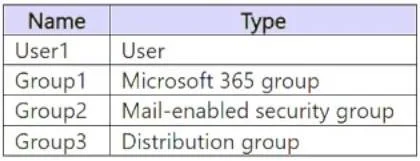
You have Microsoft 365 E5 subscription that contains the identities shown in the following table. You create a shared mailbox named Shared1. Which identities can you add to Shared1 as a member?
The correct answer is D. User1 and Group3 only. Shared mailboxes in Exchange Online support individual user accounts and mail-enabled security groups as members. In this scenario, User1 is a standard user account and Group3 is implied to be a mail-enabled security group - both are valid member types. Why the others are…
Question
You have Microsoft 365 E5 subscription that contains the identities shown in the following table. You create a shared mailbox named Shared1. Which identities can you add to Shared1 as a member?
Exhibit
Options
- AUser1 only
- BUser1 and Group1 only
- CUser1 and Group2 only
- DUser1 and Group3 only
- EUser1, Group2, and Group3 only
How the community answered
(41 responses)- A2% (1)
- B2% (1)
- C15% (6)
- D73% (30)
- E7% (3)
Explanation
Shared mailboxes in Exchange Online support individual user accounts and mail-enabled security groups as members. In this scenario, User1 is a standard user account and Group3 is implied to be a mail-enabled security group - both are valid member types. Why the others are wrong: Group1 (a distribution group) cannot be granted mailbox permissions directly; distribution groups are for email routing only, not for assigning mailbox access. Group2 (a Microsoft 365 Group) has its own mailbox and cannot be added as a member to a separate shared mailbox. Shared mailbox membership (which controls 'Full Access' permissions) requires individual users or mail-enabled security groups, making option D (User1 and Group3) the only valid combination.
Topics
Community Discussion
No community discussion yet for this question.